
If your site has a contact form, analytics, a newsletter, or a checkout, it collects personal data. Most privacy laws say you have to tell visitors what you collect and why. A privacy policy is where you do that.
This guide covers what to put in it, which laws apply to your site, how to build one in WordPress, and where to show it.
Here’s the tl;dr:
- List what you collect, how, and why.
- Name every third-party tool that touches visitor data (Google Analytics, Meta Pixel, your email tool).
- Explain visitors’ rights and how they can use them.
- Add a contact method and an effective date.
- Link the policy in your footer and on every form that collects data.
What is a privacy policy?
A privacy policy is a public statement that explains how your website collects, uses, stores, shares, and protects visitors’ personal data. Some laws call it a privacy notice or privacy statement.
Personal data is any information that can identify a person. On a typical WordPress site, that includes:
- Names and email or postal addresses
- IP addresses, phone numbers, and dates of birth
- Financial details, such as card numbers entered at checkout
- Cookie IDs and other online identifiers set by tracking cookies
Do you need a privacy policy?
If you collect any of the data above, almost always yes. 3 reasons:
1. The law. California’s CalOPPA requires a posted privacy policy on any commercial website that collects personally identifiable information from California residents. There’s no size threshold. The GDPR requires you to give EU visitors this information when you collect their data. More on both below.
2. Your tools. Third-party services make it a condition of use. Google Analytics terms say: “You must disclose the use of Google Analytics, and how it collects and processes data.” Meta’s Business Tools Terms require “a clear and prominent notice” on each page where the Meta Pixel runs.
3. Trust. Visitors check the policy before they hand over an email address or card number. A clear one shows them what you do with it.
WordPress won’t do this for you. Its Settings > Privacy screen creates a template page, but the documentation says it’s your job to fill in the details and keep them accurate.
Which privacy laws apply to your WordPress site?
The law follows your visitors, not your server. A blog hosted in Texas can still fall under the GDPR if it collects data from people in France.
| Law | Where | When it applies to your site | What your policy needs |
|---|---|---|---|
| GDPR | EU (applies since May 25, 2018) | You offer goods or services to people in the EU, or track their behavior | Legal basis for each use, retention periods, visitor rights, transfers outside the EU, contact details. Fines go up to €20 million or 4% of global annual turnover, whichever is higher (Art. 83). |
| CCPA, as amended by CPRA | California (since Jan 1, 2020) | For-profit business with more than $26,625,000 in annual revenue (CPPA, 2025 figure), or that buys, sells, or shares data of 100,000+ California consumers or households, or earns 50%+ of revenue from selling or sharing it | Categories collected, purposes, rights to know, delete, correct, and opt out. A “Do Not Sell or Share” link if you sell or share data. |
| CalOPPA | California (since 2004) | Any commercial site that collects personally identifiable information from California residents | See the list below the table |
| Other US state laws | 20 states as of August 2026 | Thresholds differ by state. Indiana, Kentucky, and Rhode Island took effect on Jan 1, 2026. | Similar rights and opt-outs, with state-specific details |
| PIPEDA | Canada (law since 2000, in full since 2004) | You collect personal information in commercial activity | Built on 10 principles (OPC). See the list below. Bill C-36 (introduced June 15, 2026) would replace it, but PIPEDA still applies. |
| LGPD | Brazil (in force since 2020, penalties since Aug 1, 2021) | You process data of people in Brazil or offer them services | Legal basis, purposes, data subject rights, controller contact |
| PIPL | China (since Nov 1, 2021, source) | You offer products or services to people in China, or analyze their behavior | Purposes, methods, retention, how to exercise rights |
| PDPA | Thailand (enacted 2019, fully enforced June 1, 2022) | You collect data from people in Thailand | Purposes, retention, rights, contact details |
CalOPPA: your policy must include (Cal. Bus. & Prof. Code § 22575):
- The categories of personal information you collect, and the types of third parties you share it with
- How visitors can review and request changes to their data, if you offer that
- How you tell visitors about material changes to the policy
- The effective date
- How you respond to browser Do Not Track signals
- Whether other parties can track visitors across sites when they use yours
PIPEDA: 4 of its 10 principles shape your policy most:
- Consent: people must know about and agree to how you collect, use, and share their data.
- Identifying purposes: say why you collect data before or when you collect it.
- Safeguards: protect data in line with how sensitive it is.
- Individual access: people can ask to see their data and correct it.
Sector laws apply on top of these. Health providers need to check HIPAA, and sites aimed at children under 13 need to follow COPPA.
EU visitors? Our GDPR privacy policy guide matches each GDPR principle to the wording your policy needs.
What to include in your privacy policy
Write it for your site, not a generic one. Go through these 10 items:
- Data you collect. Names, emails, payment details, IP addresses, anything that identifies a person.
- How you collect it. Forms, account sign-ups, checkout, cookies, analytics scripts.
- Why you collect it. Process orders, answer support requests, send newsletters, run ads.
- How you store and protect it. Where it’s kept, who can access it, how long you keep it.
- Who you share it with. Name each third-party service. On most WordPress sites, that means Google Analytics, Google Tag Manager, Meta (Facebook) Pixel, X (Twitter) embeds, your email platform, and your payment processor. If you send data outside the EU, cover transfers (for example under the EU-US Data Privacy Framework).
- Visitor rights. Access, correction, deletion, opt-out. Explain how to send a request.
- Cookies and tracking. What runs on your site and how visitors change their choices. Put the details in a separate cookie policy and link it.
- The laws you follow. GDPR for EU visitors, CCPA for Californians, and so on.
- Contact details. An email address or form for privacy questions.
- Updates. An effective date, and how you tell visitors about changes.
For a longer checklist, see what a privacy policy needs to include. For errors to avoid, see privacy policy issues to avoid.
Create a privacy policy with WPLP Legal Pages
WPLP Legal Pages is a WordPress plugin. It builds legal pages from your answers to a short questionnaire and publishes them on your site.
- In your WordPress dashboard, go to Plugins > Add New. Search for “WPLegalPages”, then click Install Now and Activate.
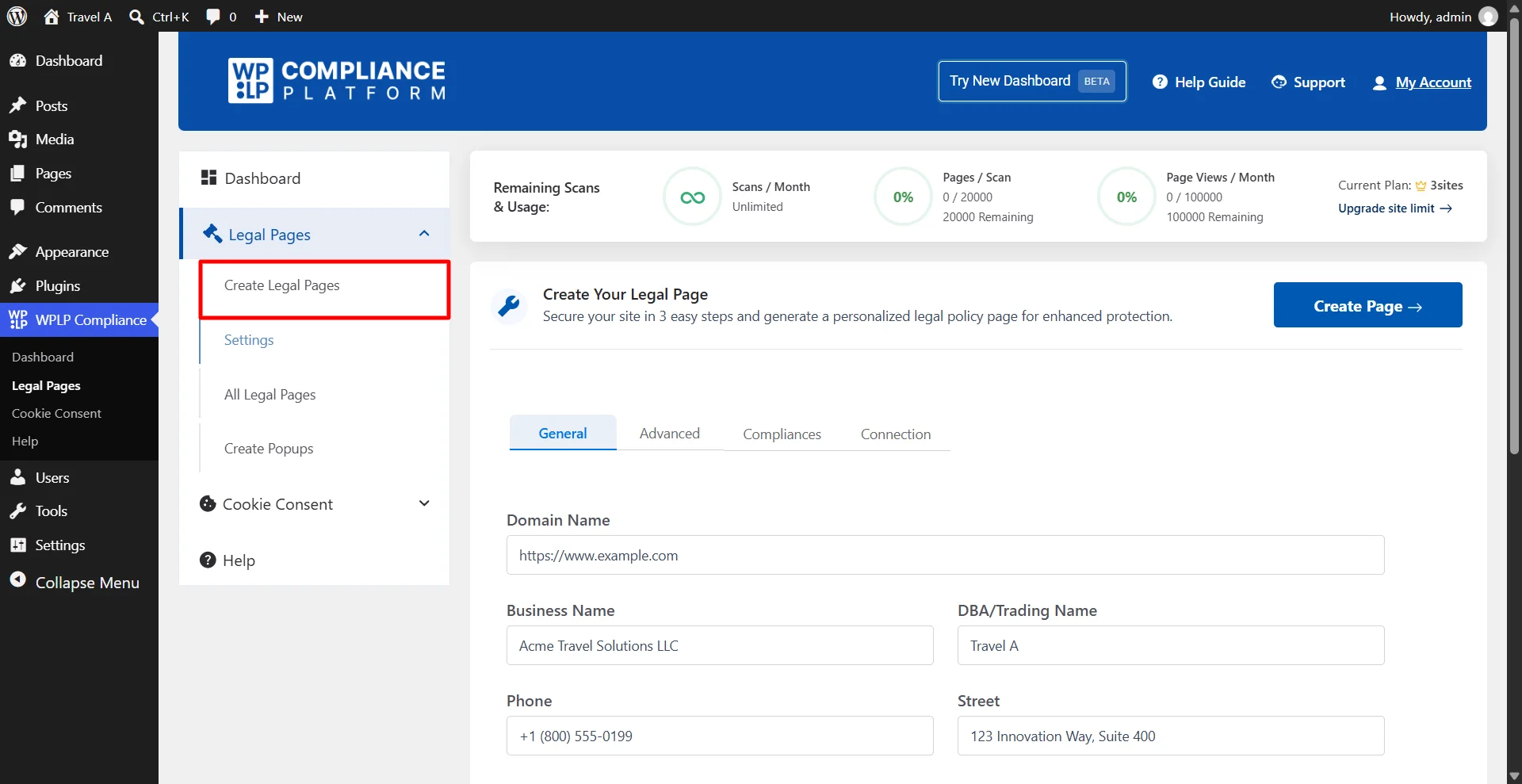
- Go to WP Legal Pages > Create Page. Enter your business profile once: business name, address, domain, and niche. Every page you create reuses it.
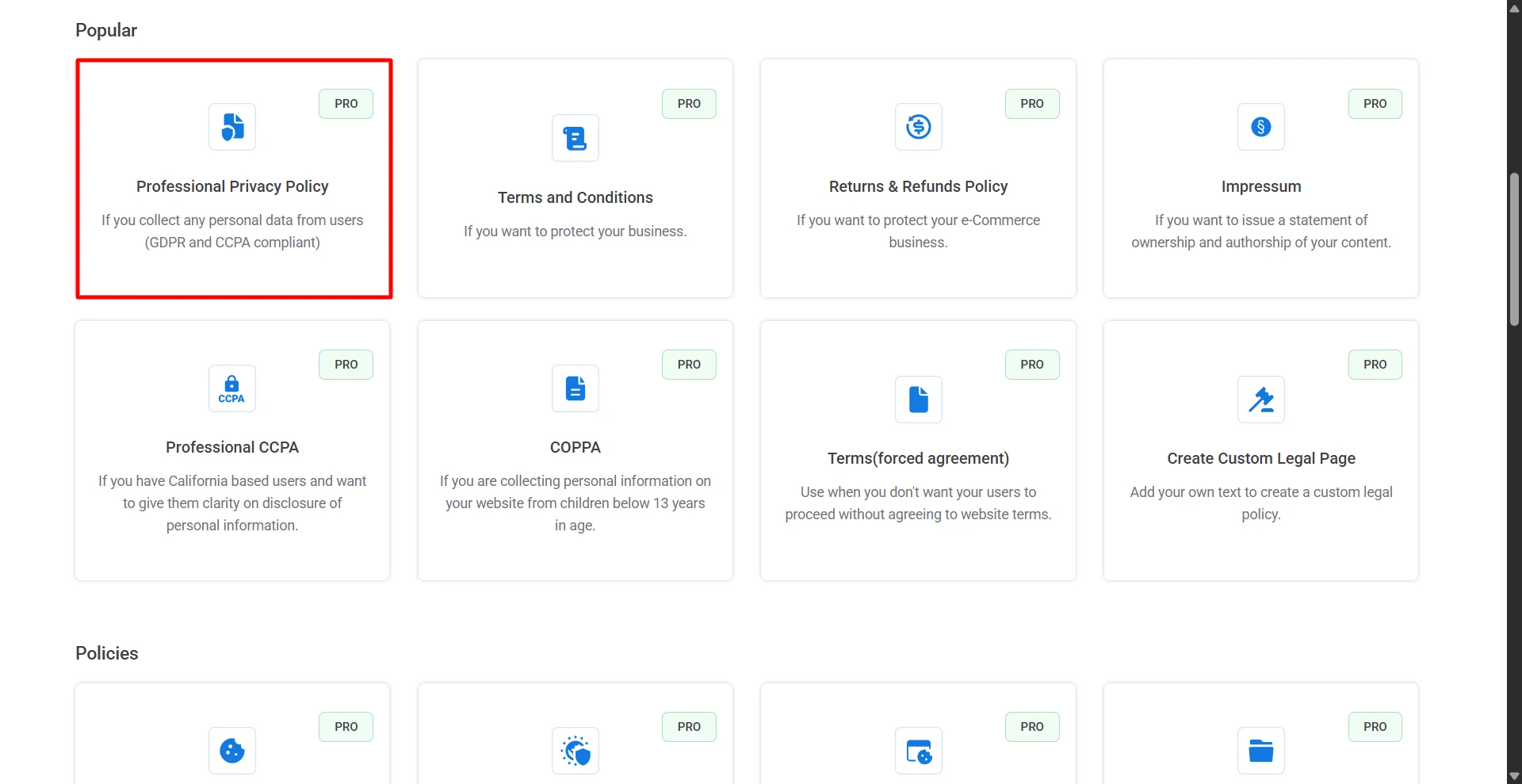
- Choose a template. The Standard Privacy Policy is in the free plugin. The Professional Privacy Policy (written for the GDPR and the CCPA).
- Answer the questionnaire about what your site collects: contact forms, analytics, newsletter sign-ups, checkout, affiliate links. Click Next.
- Preview the policy, then click Create and Edit. Make any changes in your usual editor (Gutenberg, Elementor, or Divi), then click Publish.
- Go to Settings > Privacy in WordPress and select the new page. WordPress then links it on your login and registration pages.
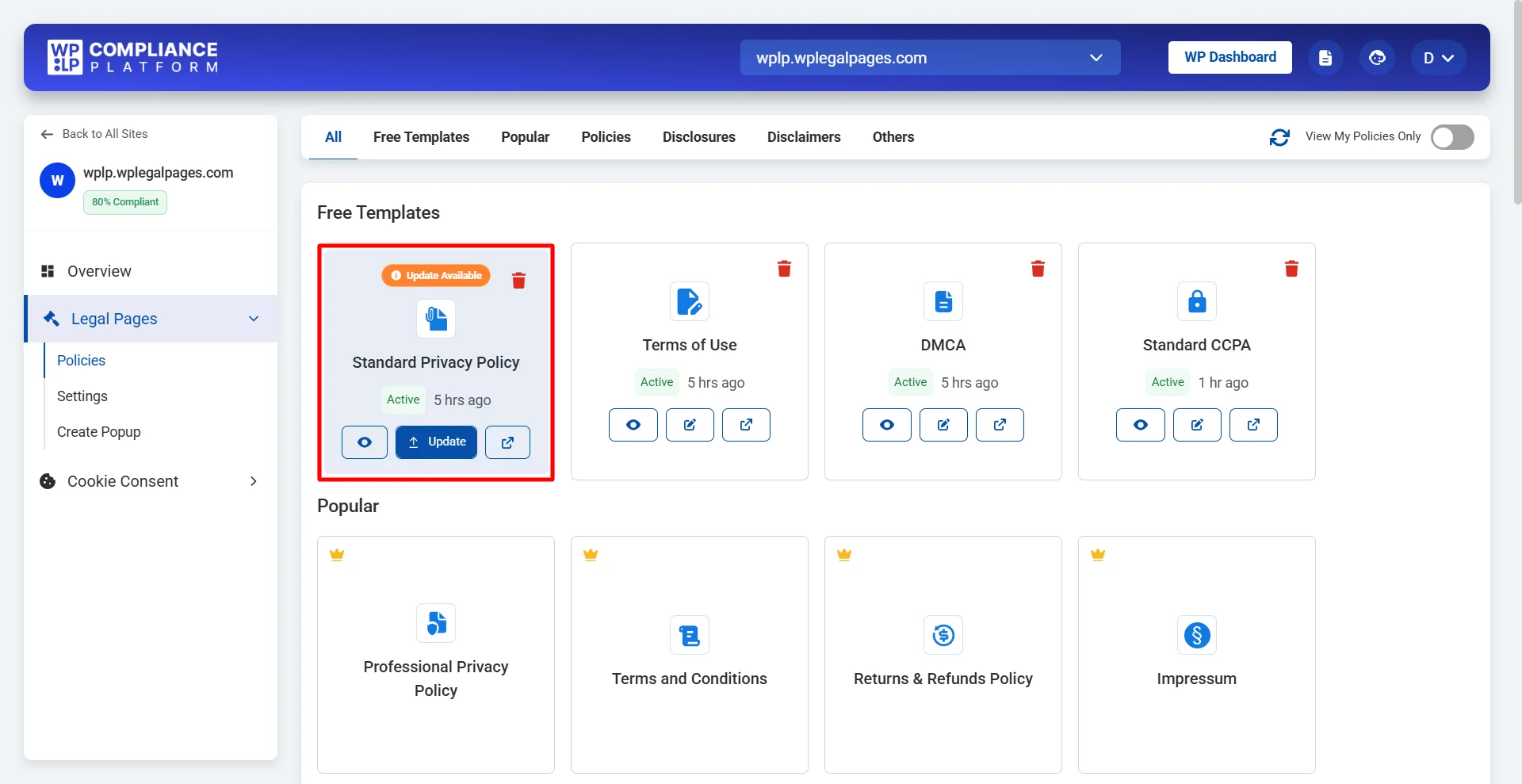
The WPLP Auto Update Policy feature helps website owners keep their legal policies up to date when their website changes.
With this feature, you can simplify policy maintenance by automatically updating your website’s legal policies when relevant changes occur, reducing the need to review and edit them manually.
Prefer to start in the browser? Try the privacy policy generator.
Where should you display your privacy policy?
Put it everywhere a visitor hands over data, plus one place they can always find it:
- Footer. The standard spot, 1 click from every page.
- Header or main menu. Optional, but it makes the policy easier to find.
- Registration and sign-up pages. Link it next to the submit button.
- Contact forms. Add a line with a link under the form. See how to build a GDPR contact form.
- Email sign-up forms. Newsletter boxes collect emails, so link the policy there too.
- Checkout pages. Visitors enter payment details here. See our ecommerce privacy policy guide.
- Cookie consent banner. Link the privacy policy and the cookie policy in the banner. Here’s how to add a cookie banner in WordPress.
- About Us page. Many sites link it with their company details.
- App settings. If you have a mobile app, put the link in its settings or menu.
FAQ
Yes. Make sure it matches what your site collects and covers each law that applies to your visitors.
For most sites, yes. CalOPPA requires one on any commercial site that collects personal information from California residents. The GDPR requires the same information for EU visitors. Google Analytics and Meta also require one as a condition of use.
For a simple site with a contact form and analytics, a free template can cover the basics. If you sell online, run ad pixels, or have many visitors from the EU or California, you need a policy that covers the GDPR and the CCPA in detail. Free templates usually leave those out.
No. Settings > Privacy creates a template page with a guide. You write the content and keep it up to date.
Conclusion
Start with what your site does: list your forms, scripts, and tools. Then check which laws your visitors bring with them. Write the policy from that list, link it in your footer and on every form, and update it when your setup changes.
Need it done today? WPLP Legal Pages turns your answers into a published privacy policy.
Related reads:
This article is for information only and is not legal advice.