Summary
In this guide, you’ll learn what a GDPR Privacy Policy is, what information it should include, how GDPR principles affect it, and how to create one using both WordPress’s built-in privacy tools and WPLP Legal Pages.
Under GDPR, every website that collects user data must have a privacy policy. Without one, you may face compliance issues and legal risks. Data privacy is more important than ever due to the growing number of data breaches worldwide.
A privacy policy plays a crucial role in explaining how user information is collected and used. It is also one of the key requirements of GDPR.
For website owners who collect or process data from EU users, having a WordPress Privacy Policy GDPR compliant document is essential. This article will show you how to create one for your WordPress website.
Understanding GDPR Privacy Policies For WordPress Websites
A WordPress Privacy Policy GDPR document explains how your website collects, processes, stores, and protects personal data according to the GDPR.
The regulation came into force on May 25th, 2018, and is an EU regulation that protects users’ privacy and data security. The GDPR applies to any business or website that collects personal data from EU residents, regardless of its location.
Personal data can be used to identify someone, such as name, e-mail address, IP address, payment information, or any information that pertains to an individual.
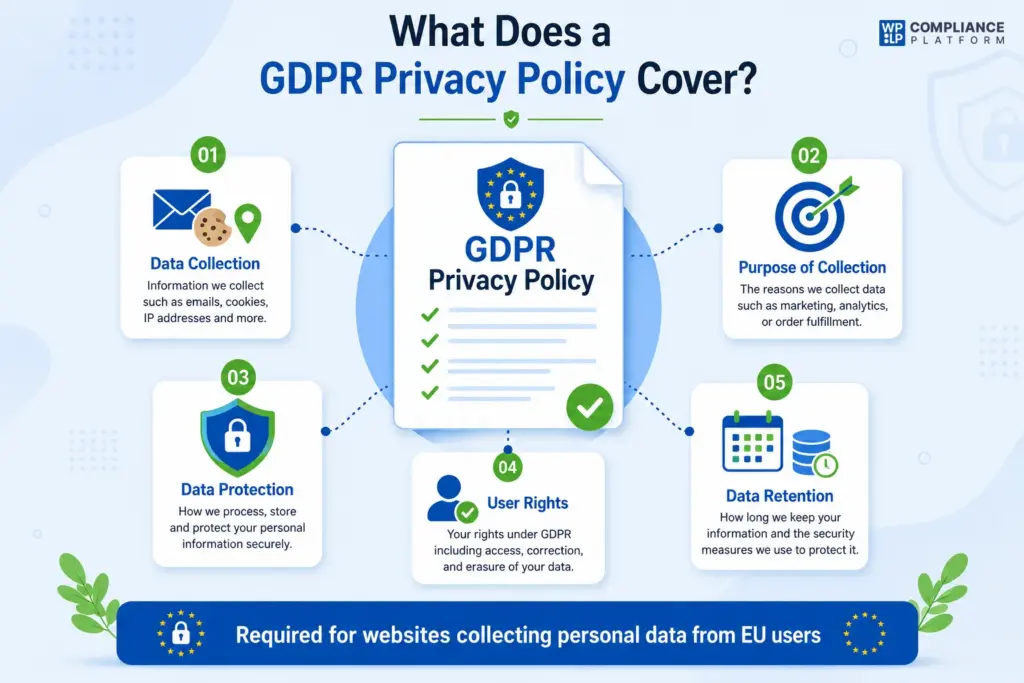
Hence, by adding a GDPR Privacy Policy, you are providing transparency that relates to:
- What information is collected from users (for example, emails, cookies, IP addresses)
- The purpose for which it is collected (for example, marketing, analytics, or order fulfillment)
- How the information is processed and shared
- What rights users have under GDPR, including access, correction, and erasure
- How long the information is kept, and what security measures are used to protect it
Failure to comply with GDPR can result in fines of up to €20 million or 4% of annual global turnover.
Adding a GDPR Privacy Policy is critical for any ecommerce store, SaaS business, blog, mobile application, or platform collecting personal data.
To generate one, you can either write it manually, use a privacy policy generator, or get advice from a lawyer for full compliance.
Thus, adding this policy helps build user trust, protects the business from legal risks, and ensures transparency in the use of personal data.
Importance of GDPR Compliance in Privacy Policy
The General Data Protection Regulation is one of the most important privacy laws. It requires businesses to handle personal data responsibly and clearly explain how user information is collected, processed, stored, and protected.
A WordPress Privacy Policy GDPR page helps website owners communicate these requirements clearly to users.
1. Ensures Transparency and User Trust
GDPR requires businesses to provide clear and concise information about their data practices. A well-structured privacy policy ensures users understand:
- What personal data is collected (e.g., names, emails, IP addresses)
- Why the data is collected
- How long the data is stored
- Whether the data is shared with third parties
Thus, the more transparent a business is, the more trust it can build with its users.
2. Legal Requirements for Avoiding Penalties
Under GDPR, any website collecting personal information from EU residents must have a privacy policy that meets GDPR requirements.
The penalties for non-compliance can be severe. Fines can reach up to €20 million or 4% of the company’s global annual revenue, whichever is higher.
3. To Empower Users with Control Over Their Data
User rights enforced by GDPR must be clearly explained in the privacy policy. These rights include:
- Right of Access – Users can request a copy of their personal data.
- Right to Rectification – Users can correct inaccurate or outdated information.
- Right to Erasure (Right to be Forgotten) – Users can request the deletion of their personal data.
- Right to Data Portability – Users can transfer their data to another service provider.
- Right to Object – Users can object to certain types of data processing.
Including these rights in your privacy policy helps users understand how they can control their personal information.
4. It Helps Protect Businesses and Users
GDPR places a strong emphasis on data security and requires organizations to take reasonable measures to protect personal information.
A privacy policy should explain the safeguards you use, such as:
- Encryption techniques
- Secure servers and firewalls
- Data breach response procedures
This helps reduce risks and reassures users that their information is being handled responsibly.
5. Covers Third-Party Data Sharing
Many websites rely on third-party services such as payment gateways, analytics tools, email marketing platforms, and advertising networks.
Under GDPR, businesses should explain:
- Which third parties receive personal data
- Why is the data shared
- How those third parties help deliver services
This transparency helps users understand where their information goes and how it is used.
6. Supports Compliance with Other Privacy Laws
A GDPR compliant privacy policy is important for ecommerce stores, SaaS platforms, blogs, mobile apps, and other online businesses.
Many privacy laws around the world also require businesses to maintain accurate and up-to-date privacy disclosures. Examples include:
- CCPA (California Consumer Privacy Act)
- Quebec Law 25
- UK GDPR
- LGPD (Brazil)
In addition, there are other website legal requirements that website owners should comply with depending on their location and audience.
How GDPR Principles Influence Privacy Policies
A privacy policy is a public-facing document that outlines how an organization collects, uses, stores, and safeguards personal data. Every WordPress Privacy Policy GDPR document should reflect these principles to remain compliant.
Below is how each principle influences a privacy policy.
1. Lawfulness, Fairness, and Transparency
- This is the foundation of every privacy policy.
- It explains what data is collected, why it is collected, and how it is processed.
- It identifies the legal basis for processing personal data, such as consent, contractual necessity, or legal obligations.
- It uses language that is easy for users to understand.
Example section in a policy:
We collect your email address for product updates based on your consent.
2. Purpose Limitation
- Explains the specific reasons personal data is collected.
- Prevents broad or vague statements about data usage.
- Requires users to be informed before data is used for a new purpose.
Example section:
We use your data only to manage your account and provide support. We do not use your data for advertising unless you provide consent.
3. Data Minimization
- Demonstrates that only necessary data is collected.
- Shows users that excessive information is not requested.
- Helps build trust by limiting unnecessary data collection.
Example wording:
We only collect the information required to fulfill your request or provide our services.
4. Accuracy
- Explains how users can review and update their information.
- Demonstrates a commitment to maintaining accurate records.
Example section:
You can update or correct your personal information by logging into your account or contacting our support team.
5. Storage Limitation
- Explains how long personal data is retained.
- Describes when information is deleted or anonymized.
Example language:
We retain your information only for as long as necessary to provide our services and meet legal obligations.
6. Integrity and Confidentiality (Security)
- Explains the measures used to protect personal data.
- Reassures users that security practices are in place.
Example section:
We use industry-standard security measures to protect your personal information from unauthorized access.
7. Accountability
- Demonstrates the organization’s responsibility for GDPR compliance.
- Identifies the data controller and contact information.
- Provides a method for users to raise privacy concerns.
Example section:
Our organization is committed to protecting your data and complying with GDPR. If you have questions about how we process your information, please contact us at [email protected].
AI and Automated Decision Making
GDPR places additional obligations on organizations that use automated decision-making affecting users. As AI tools become more common, including clear disclosures about these activities has become an important privacy policy best practice.
Free Method: Using WordPress’s Built-In Privacy Policy Generator
Before using a third-party plugin, it’s worth knowing that WordPress includes a built-in Privacy Policy generator.
Since WordPress 4.9.6, website owners have been able to create a basic privacy policy directly from the dashboard. This gives website owners a starting point for creating a WordPress Privacy Policy GDPR page.
To access it:
WordPress Dashboard → Settings → Privacy
From there, you can:
- Create a new Privacy Policy page
- Use WordPress’s suggested privacy policy text
- Edit the content to match your website’s data practices
- Publish the page directly to your site
The built-in template includes sections covering:
- Comments
- Media uploads
- Contact forms
- Cookies
- Embedded content
- Analytics
- User accounts
While this is a great free starting point, most websites will still need to customize the content to accurately reflect their data collection practices and third-party services.
For businesses that need more detailed legal templates, automated updates, and additional compliance documents, a dedicated privacy policy generator can provide more flexibility.
How to Create & Add a GDPR-Compliant Privacy Policy in WordPress
Creating a GDPR compliant privacy policy is crucial for complying with data protection laws and maintaining transparency with your users.
While WordPress offers a built-in privacy policy generator, many website owners prefer dedicated tools that provide ready-made legal templates and guided setup options.
This is where WPLP Legal Pages comes in.
WPLP Legal Pages – A GDPR Privacy Policy Generator for WordPress
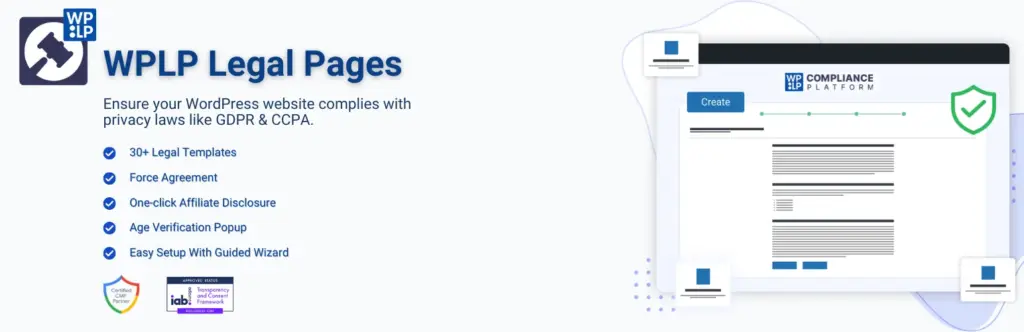
With ready-made legal templates, you can quickly create a GDPR privacy policy tailored to your business needs.
WP Legal Pages offers more than 35 legal page templates, allowing you to create important legal documents without starting from scratch.
The plugin includes templates for Privacy Policies, Terms and Conditions, Refund Policies, Disclaimers, Cookie Policies, and more.
[Keep existing CTA button]
Now, let’s see how to create a GDPR Privacy Policy using the WPLP Legal Pages plugin.
Step 1: Installing WP Legal Pages Plugin
Navigate to your WordPress Dashboard and click Plugins → Add New.
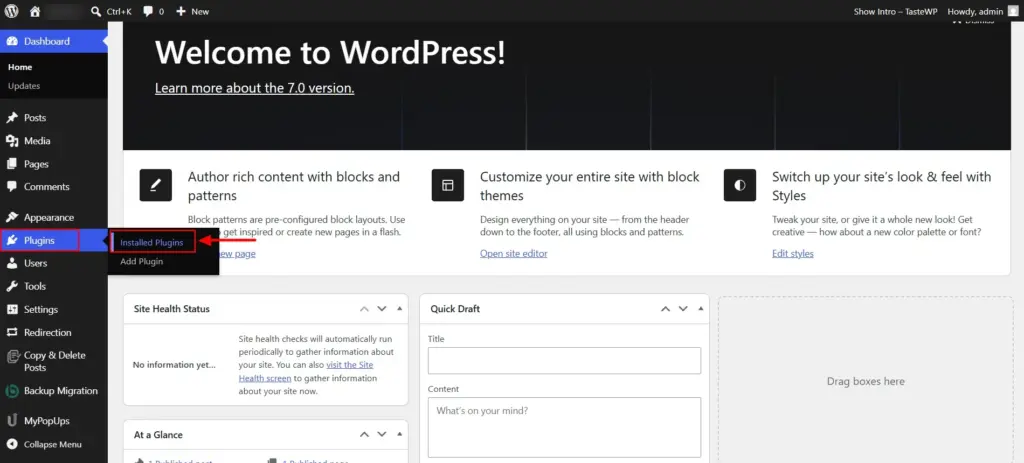
Search for WPLP Legal Pages in the search bar.
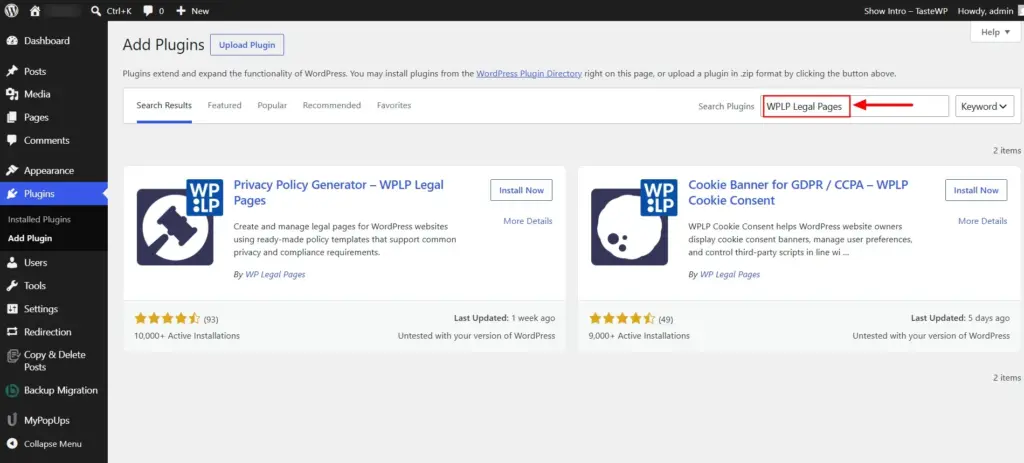
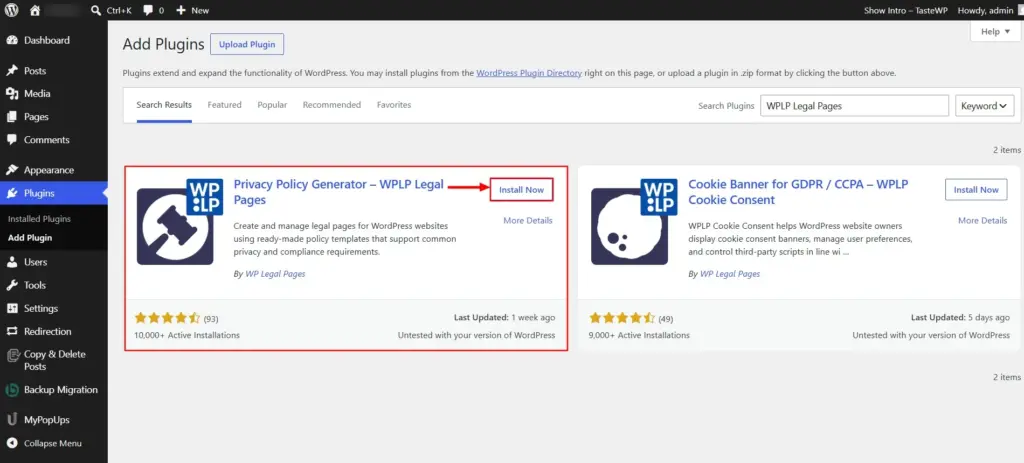
Click the Install Now button.
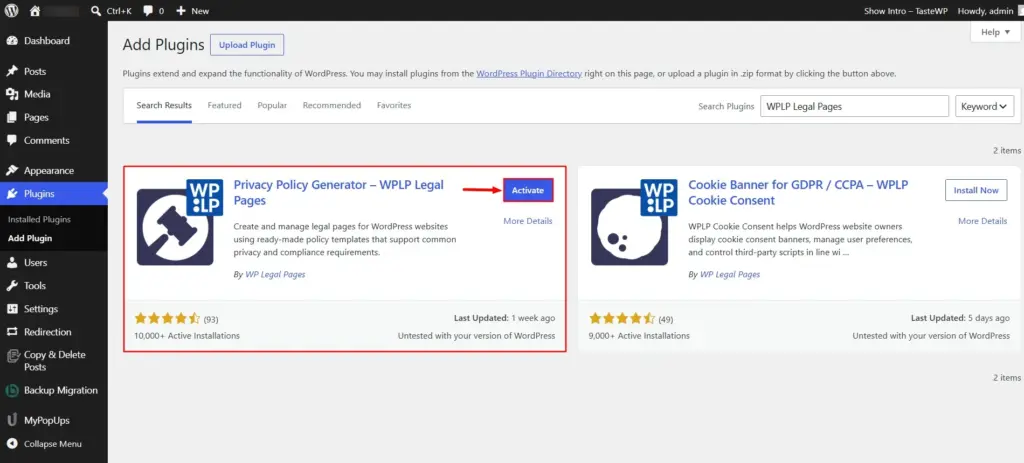
Activate the plugin by clicking the Activate button.
Step 2: Configuring WPLP Legal Pages Plugin
Once activated, access the plugin directly from your WordPress Dashboard.
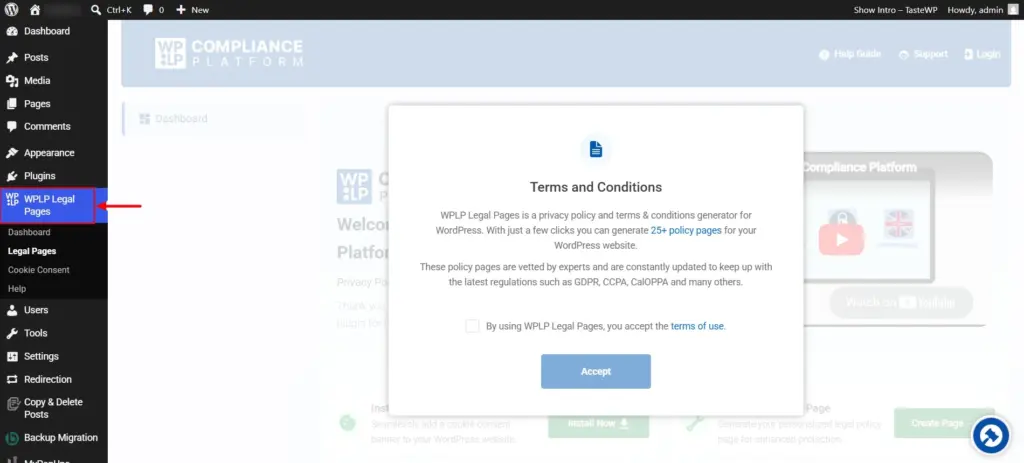
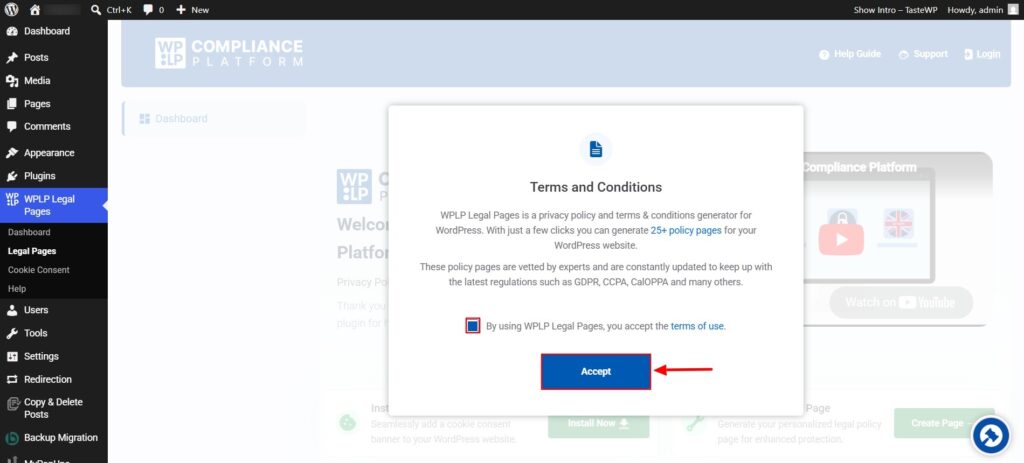
Accept the plugin’s Terms of Use to continue.
Step 3: Accessing the GDPR Privacy Policy Template
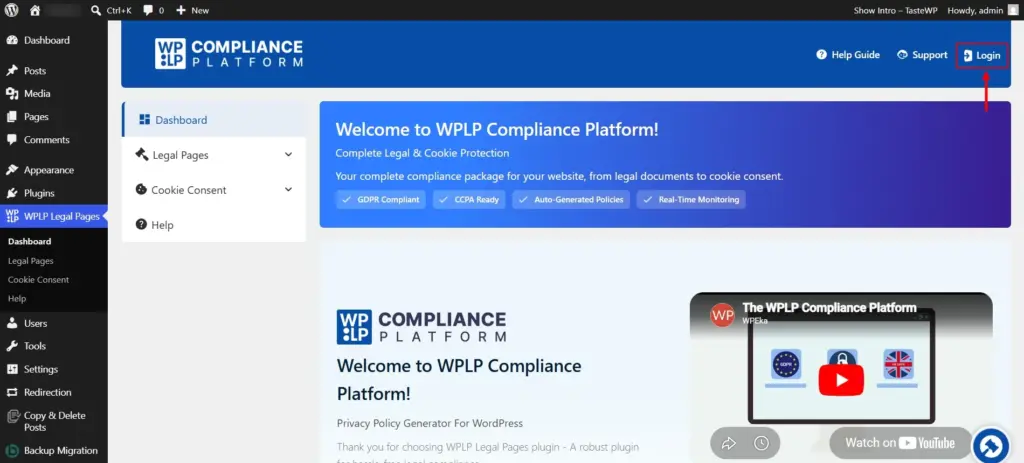
Click on the login button that you can find in the top right corner of the page.
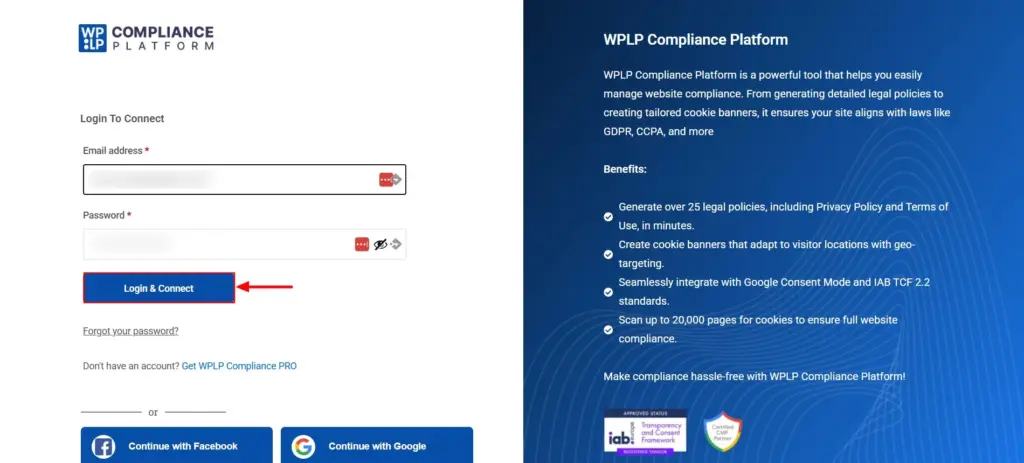
Click on the Get WPLP Compliance Pro on the signup page.
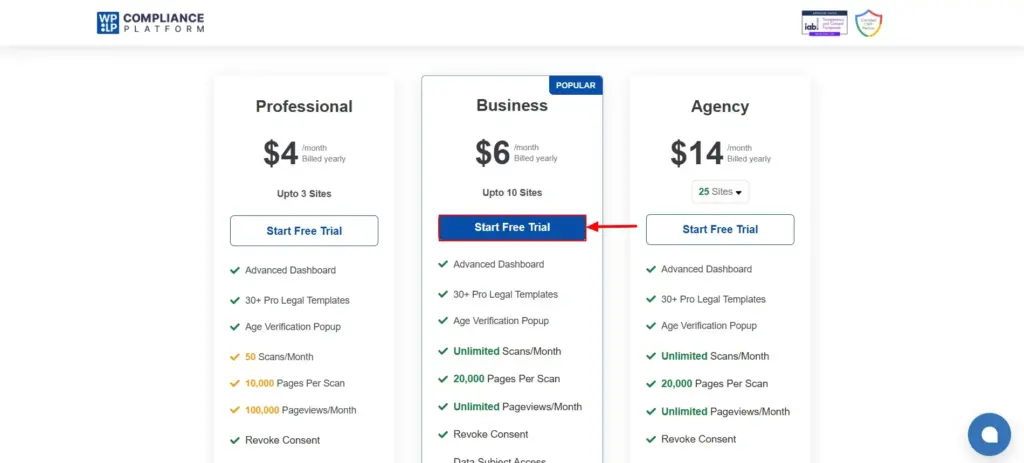
You will be redirected to the pricing page. Select your preferred plan and click Start Free Trial.
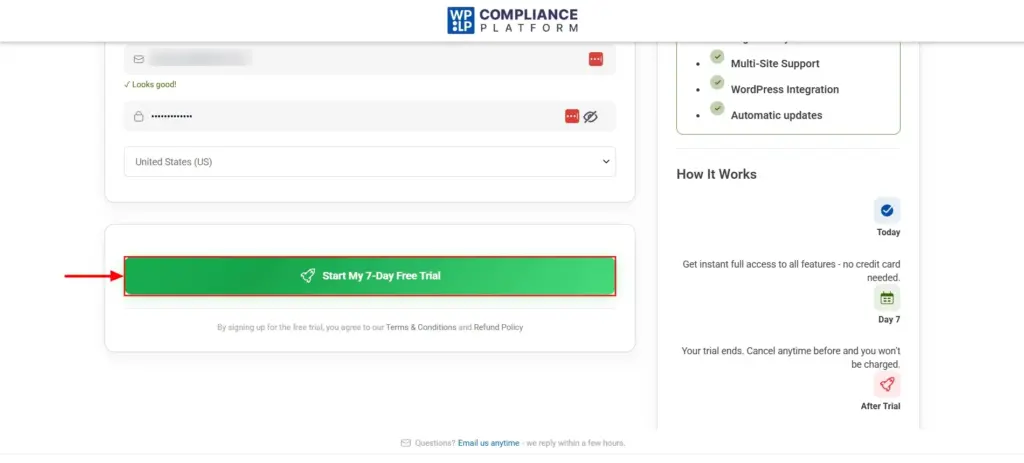
Enter your billing details and click on the Start My 7-Day Free Trial button.
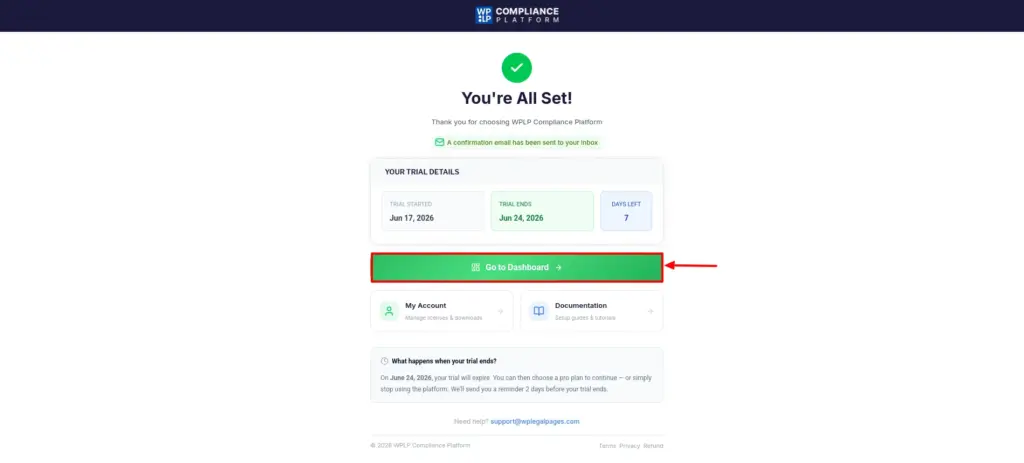
Now, in the Thank You page, you can see that your order is confirmed. Now, click on the Go to Dashboard button.
Step 4: Creating Your GDPR Compliant WordPress Privacy Policy
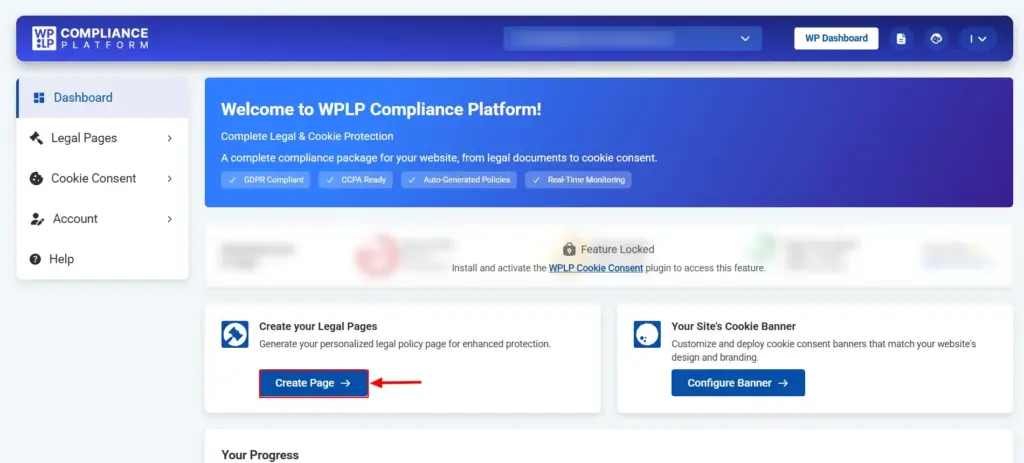
In the dashboard, you can find the Create Page button. Click on it.
Now, in the legal pages section, you can find multiple legal pages templates. As we want to create a privacy policy page that is GDPR compliant, scroll down and choose the GDPR Privacy Policy template.
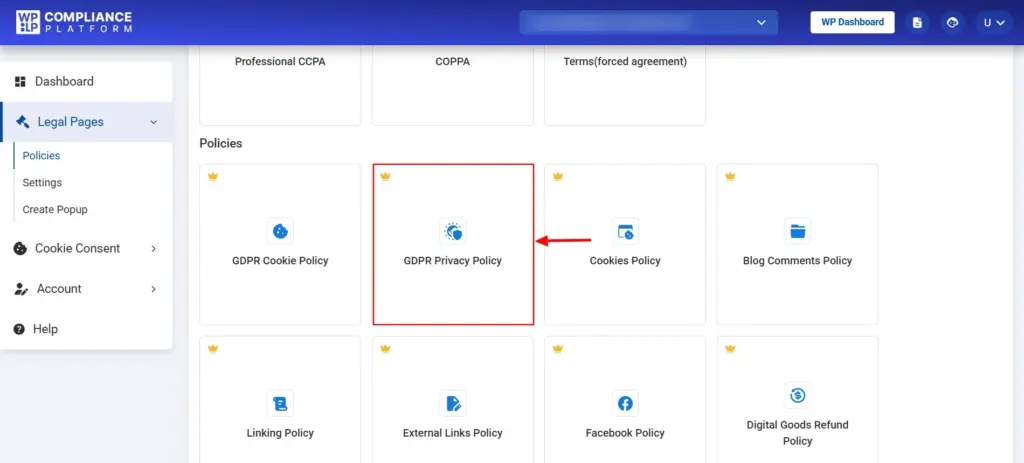
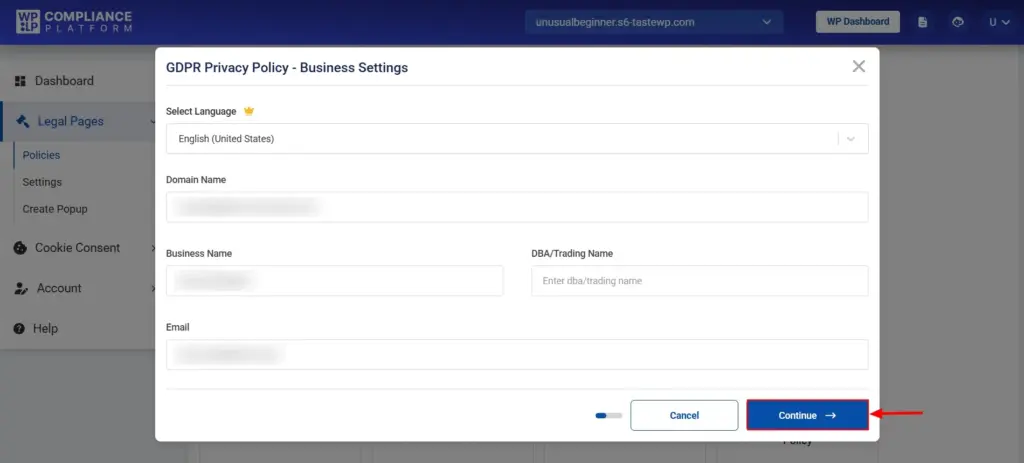
You will see a popup, where you need to enter basic business details and click Continue.
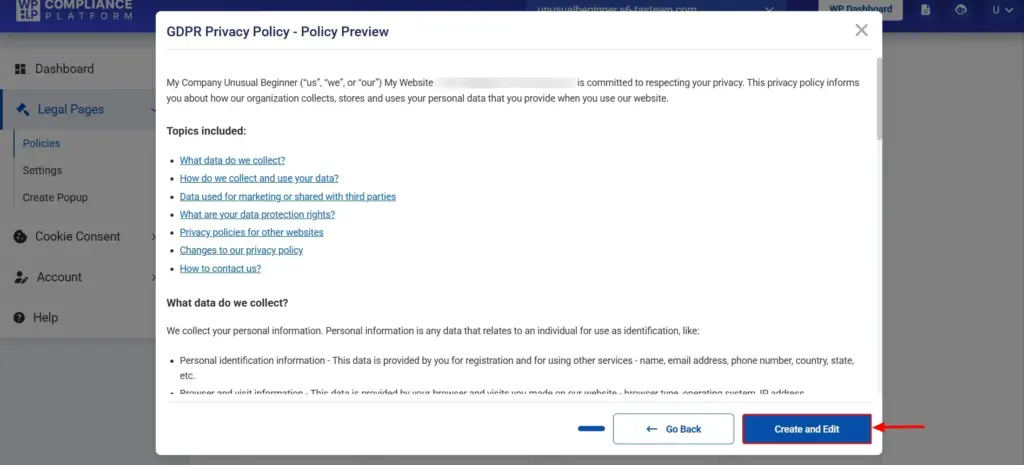
You can now see the preview of the GDPR Privacy Policy page. Click on Create and Edit once you feel everything looks good.
Then, you will be taken to the WordPress Block Editor, where you can edit and make changes to the page that you just created.
Hit Publish when everything is done.
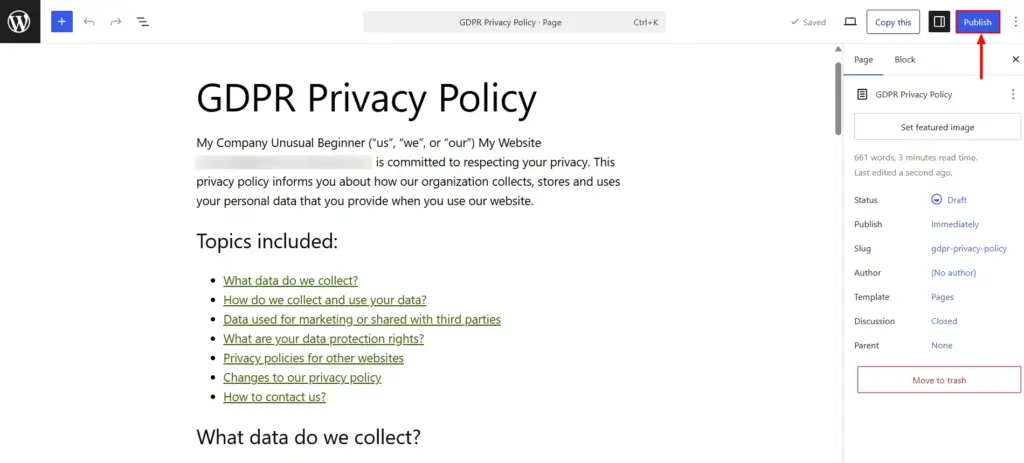
There you go. Your GDPR Privacy Policy has now been successfully added to your website.
Example of a Finished WordPress GDPR Privacy Policy
Before publishing, it’s helpful to review how the final document looks.
A completed GDPR Privacy Policy should typically include:
- Information you collect
- Why you collect it
- Legal basis for processing
- Third party services used
- Cookie usage
- User rights under GDPR
- Data retention periods
- Contact information
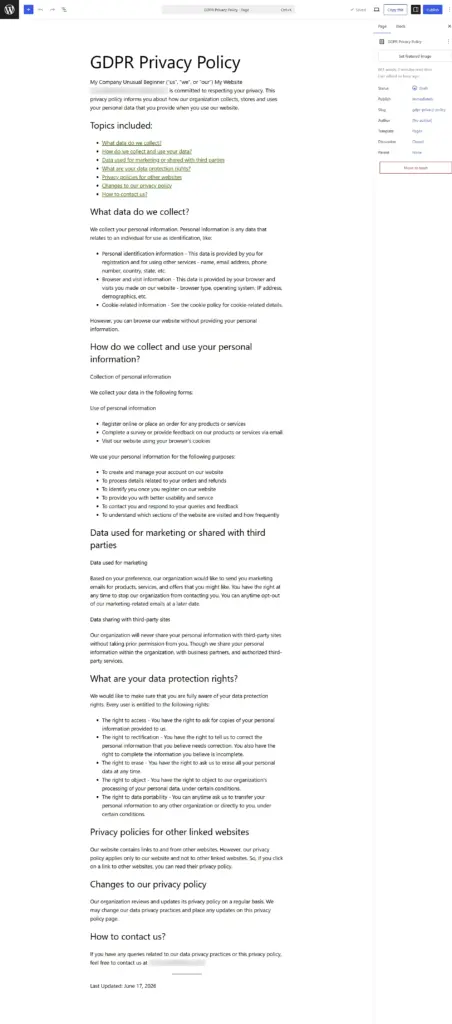
Reviewing the final output helps ensure all business-specific information has been added before publishing. Reviewing your WordPress Privacy Policy GDPR page can also help identify missing compliance disclosures.
Privacy Policy vs Cookie Policy: What’s the Difference?
Many website owners assume that a Privacy Policy and a Cookie Policy are the same thing, but they serve different purposes.
A Privacy Policy explains how your business collects, uses, stores, and shares personal information.
A Cookie Policy explains how cookies and similar tracking technologies are used on your website.
Similarly, a cookie consent banner allows users to accept or reject certain cookies before they are activated.
In most cases, GDPR compliance requires more than just a Privacy Policy. If your website uses non-essential cookies, you should also have an appropriate Cookie Policy and consent mechanism in place.
Where Should You Display Your GDPR Privacy Policy?
Your Privacy Policy should be easy to find before users share any personal information.
The most common location is the website footer, ensuring it is accessible from every page of your website.
You should also link to your Privacy Policy from:
- Signup forms
- Contact forms
- Checkout pages
- Account registration pages
- Cookie consent banners
If your website has a Help Center, Legal Center, or user dashboard, including your Privacy Policy, can further improve accessibility.
Making your Privacy Policy easy to find helps build trust, improve transparency, and support GDPR compliance.
How Often Should You Update Your Privacy Policy?
Creating a Privacy Policy is not a one-time task.
You should review and update it whenever there are significant changes to:
- The personal data you collect
- Third-party services you use
- Marketing or analytics tools
- Cookie usage
- Business operations affecting data processing
- Applicable privacy laws
As a best practice, review your Privacy Policy at least once a year, even if no major changes have occurred.
Regular reviews help ensure your policy remains accurate and compliant.
FAQ
- Can I Manually Create a GDPR Privacy Policy for My Website?
Yes. You can write a GDPR Privacy Policy yourself, but it requires a good understanding of GDPR requirements, data processing activities, user rights, and disclosure obligations.
For many website owners, using a Privacy Policy generator can make the process faster and help reduce the risk of missing important information.
- How Do I Create a GDPR Privacy Policy for Free?
You can start with WordPress’s built in Privacy Policy generator available under Settings → Privacy.
It provides a basic template covering common WordPress features such as comments, cookies, and user accounts.
You can also use the free version of WP Legal Pages to create legal pages. Advanced GDPR specific templates and additional compliance features are available in the Pro version.
- What Information Should a GDPR Privacy Policy Include?
A GDPR Privacy Policy should explain:
- What personal data you collect
- Why you collect it
- How the data is processed
- Which third parties receive the data
- How long data is retained
- User rights under GDPR
- Contact details for privacy-related requests
The exact content will depend on your website and business activities.
- Is My Website Required to Have a GDPR Privacy Policy?
If your website collects, processes, or stores personal information from individuals in the European Union, you should have a GDPR compliant Privacy Policy.
This applies even if your business is located outside the EU.
Conclusion
Adding a GDPR Privacy Policy to your website improves transparency, supports compliance, and helps build trust with your users.
Your Privacy Policy should clearly explain what information you collect, why you collect it, how it is used, and what rights users have regarding their personal data.
A well-structured WordPress Privacy Policy GDPR page makes this information easier for visitors to understand.
For best results, make sure your policy is easy to access from key areas of your website, including your footer, signup forms, checkout pages, and cookie consent banner.
While WordPress offers a built-in Privacy Policy generator, website owners who need more customization, legal templates, and compliance tools may benefit from using a dedicated solution such as WP Legal Pages.
With ready-made templates and guided setup options, WPLP Legal Pages can help simplify the process of creating and managing legal pages for your website.
If you’ve enjoyed reading this article, check out our other guides:
- How to Create a Privacy Policy for a Website
- Best Privacy Policy Generators To Check Out For Your Website
- What is a Consent Management Platform?
Need a GDPR compliant Privacy Policy? Use the WPLP Compliance Platform to create one in minutes.