WPLP Compliance Platform logo
  • Products

    Legal Pages

    Privacy Policy

    Privacy Policy

    Disclose how you collect and use user data

    Terms and conditions

    Terms and Conditions

    Set the rules for how your website is used

    Cookie policy

    Cookie Policy

    Explain how and why cookies are used on your site

    Arrow

    More Legal Policies

    Access 25+ legal page templates for compliance

    Cookie Consent

    Cookie scanner

    Cookie Scanner

    Scan and categorize cookies used on your website

    Consent management platform

    Consent Management Platform

    Collect, manage, and log user consent easily

    Google Consent Mode

    Google Consent Mode

    Maintain ad tracking while respecting user privacy

    IAB TCF 2.2

    IAB TCF 2.2

    Ensure your site meets the latest ad consent standards

    Data Subject Access Request

    Data Subject Access Request

    Let users request access or deletion of their data

    Arrow

    All Features

    Explore every feature included in our cookie consent solution

  • Privacy Laws

    USA

    California icon

    California

    California Consumer Privacy Act (CCPA)

    Virginia icon

    Virginia

    Virginia Consumer Data Protection Act (VCDPA)

    Connecticut icon

    Connecticut

    Connecticut Data Privacy Act (CTDPA)

    Utah icon

    Utah

    Utah Consumer Privacy Act (UCPA)

    Colorado icon

    Colorado

    Colorado Privacy Act (CPA)

    Neveda icon

    Neveda

    Nevada Privacy Law

    EU / Worldwide Laws

    European Union icon

    European Union

    General Data Protection Regulation (GDPR)

    UK GDPR icon

    UK GDPR

    United Kingdom (Post-Brexit version of GDPR)

    European Union icon

    European Union

    ePrivacy Directive (ePD)

    Brazil (Worldwide) icon

    Brazil (Worldwide)

    Lei Geral de Proteção de Dados (LGPD)

  • Pricing
  • Resources
    How to guide icon

    How-to Guides

    • Generate Privacy Policy
    • Generate Cookie Policy
    • Generate Terms & Conditions
    • Generate Return & Refund Policy
    • Add Cookie Banner
    • Setup Google Consent Mode v2
    Articles icon

    Articles

    Learn privacy compliance best practices, tips and industry updates.

    Documentation icon

    Documentation

    Step-by-step guides to help you install, configure and master WPLP features

    Support icon

    Support

    Need help? Contact our support team for assistance

Login
Get Started

Documentation

Find step-by-step guides, tutorials, and FAQs for all our latest plugins.

Overview

  • Getting Started
  • Setup & Configuration
  • Platform Overview

Features Walkthrough

  •  Cookie Consent
  • Legal pages
  • Dashboard

Guides

  • What is the Right to Access?
  • What is the Right to be Forgotten
  • How To Schedule Automatic Cookie Scan
  • A/B Testing Feature
  • Implementing Google Consent V2 Mode using WPLP Compliance Platform
  • Google Consent Mode Troubleshooting with WPLP Compliance Platform
  • How to Verify if Google Consent Mode is Properly Implemented
  • Right to Data Portability Explained – What It Means & How to Comply
  • How to use Script Blocker
  • Respect Do Not Track & Global Privacy Control
  • How to show Third-Party Policy Data on Your Website
  • How to Enable DSAR
  • How to create an Affiliate Disclosure Page
  • How to show the WPLP Block in Gutenberg.
  • How to Make an Announcement Banner for Legal Pages
  • How to Show Age Verification Pop-up on The Website
  • How to add Legal Page in Footer
View Categories
  • Home
  • Docs
  • WPLP Documentation
  • Overview
  • Getting Started

Getting Started

This section will guide you through installing, activating, and setting up the WPLP Compliance Platform on your WordPress site. By the end, you’ll have the plugin running with your subscription connected and ready for configuration.

Installation #

1. From WordPress Dashboard #

Log in to your WordPress Admin panel. Go to Plugins > Add Plugins.
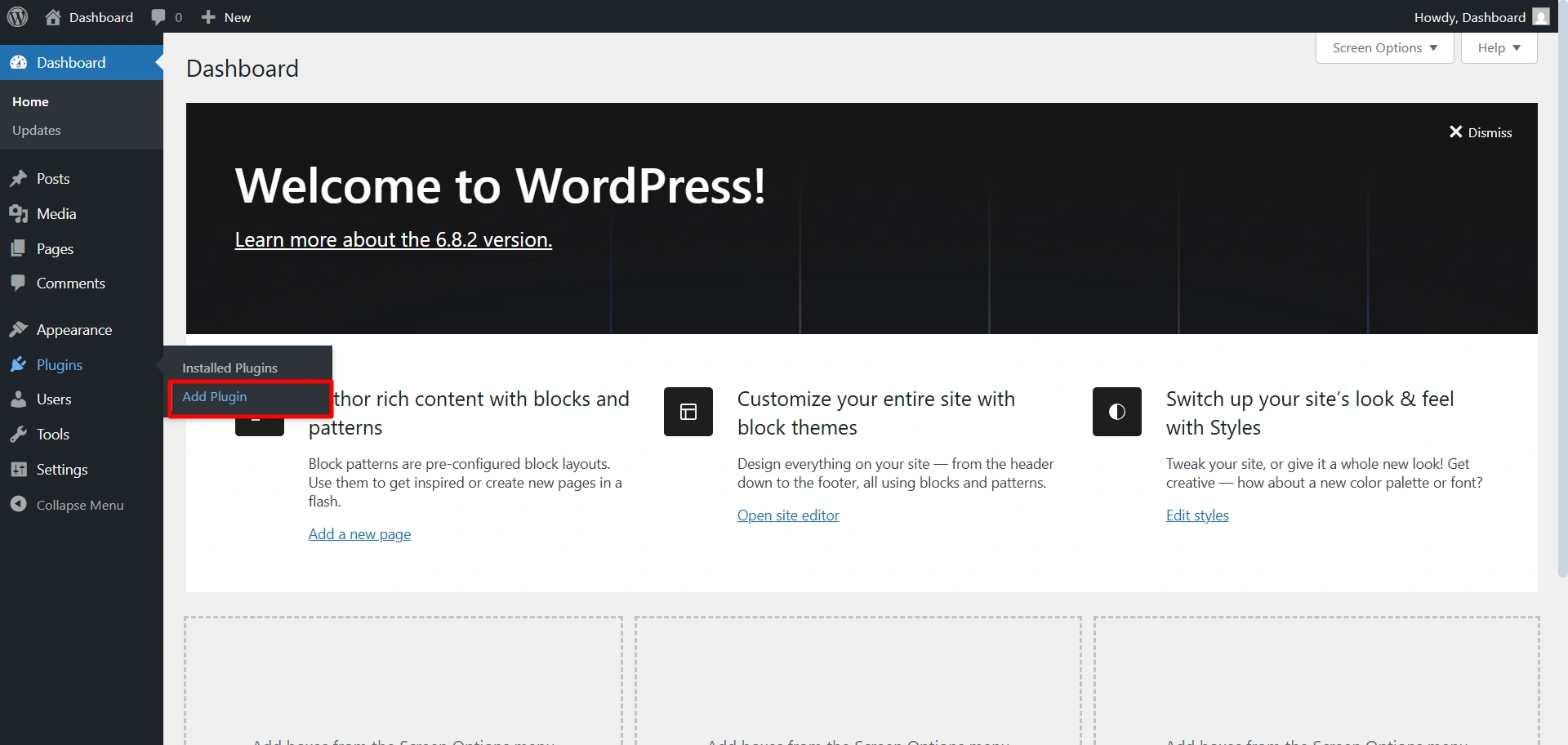
Add plugin

In the search bar, type WPLegalPages. Install Cookie Consent Manager for the cookie banner.
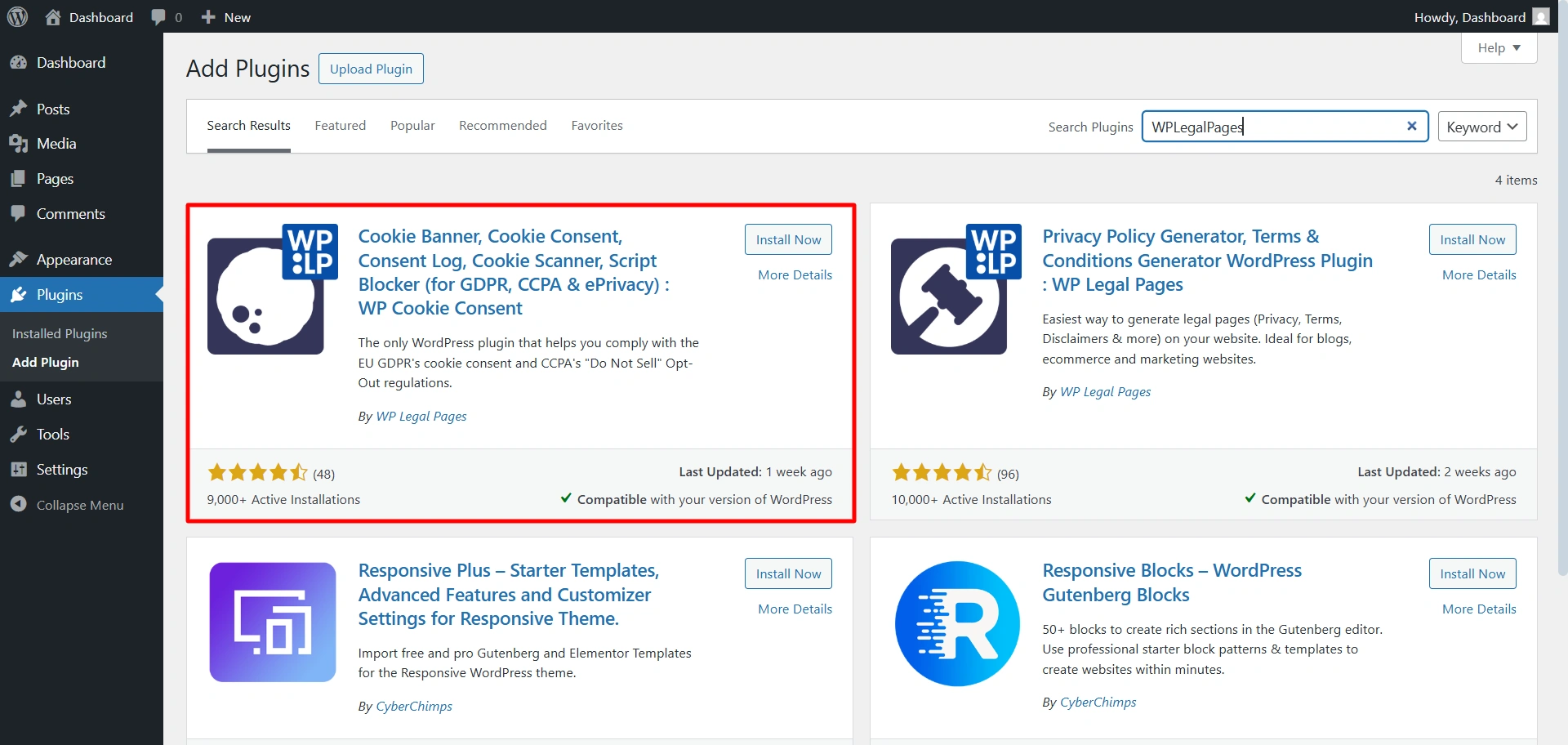
Cookie consent banner plugin

Install Legal Pages Generator for legal pages. 
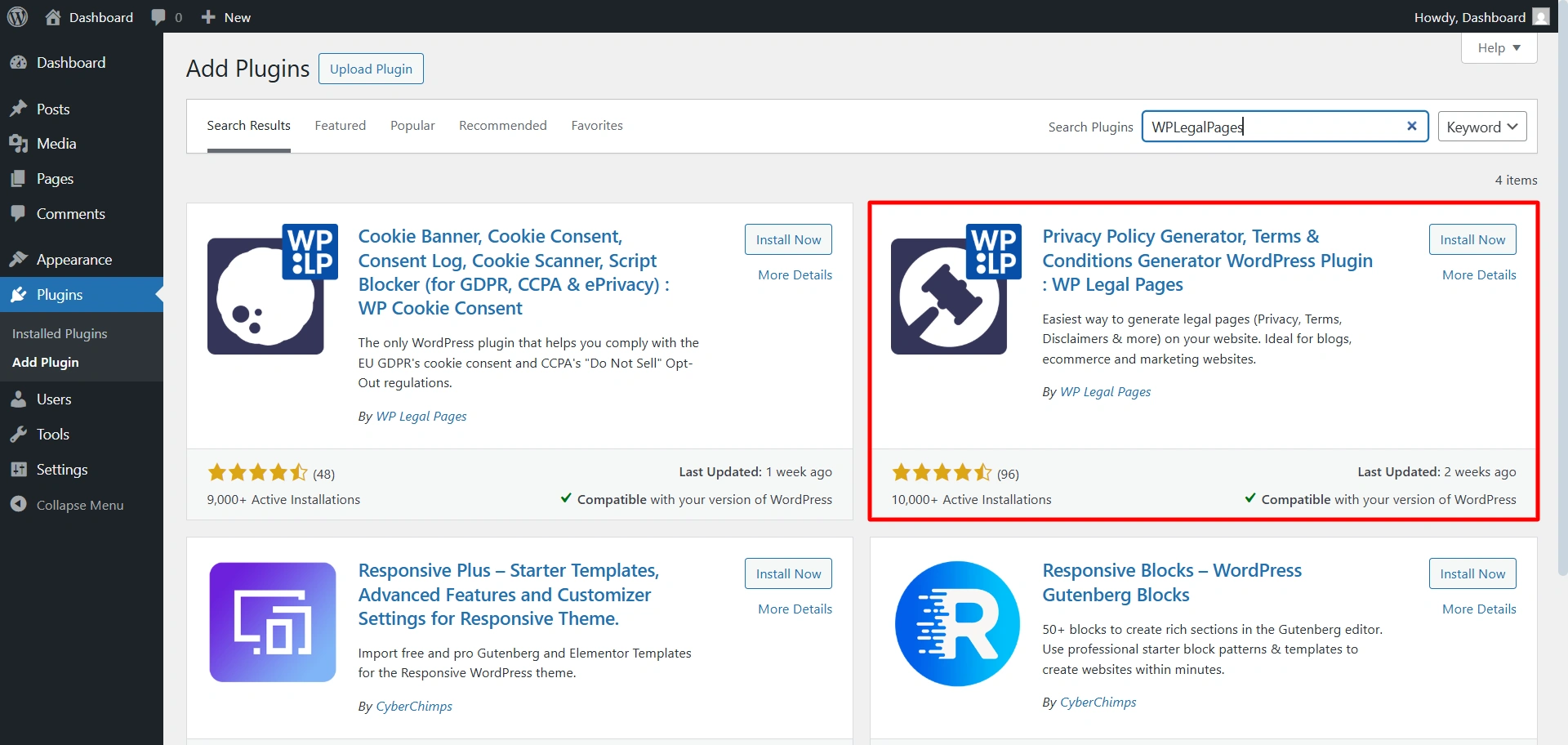
WP legal pages plugin

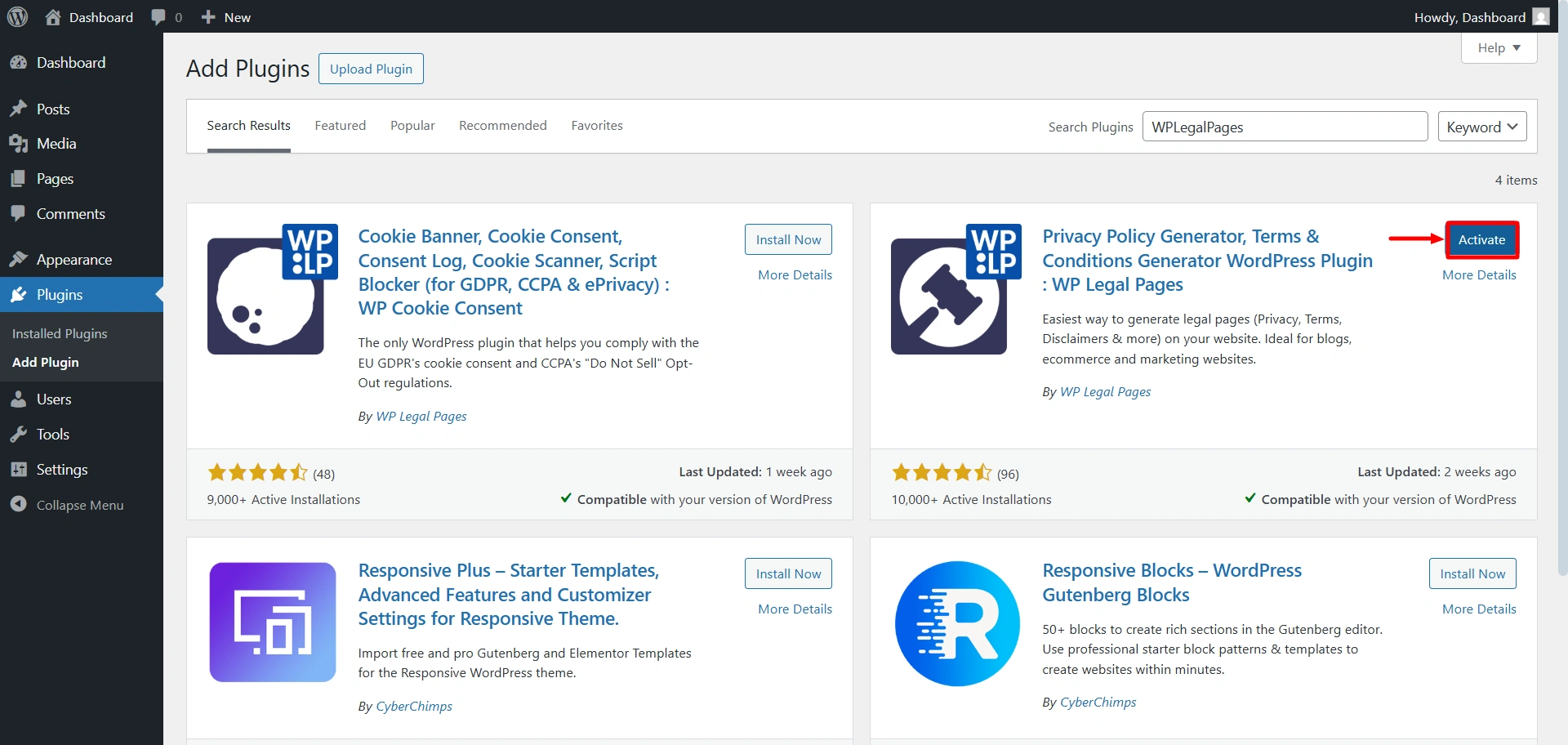
Click Install Now and then Activate.

Activate the plugin

2. Manual Upload (Zip File) #

When you log in to the website or create an account, you’ll get access to downloadable ZIP files. Download the file.

Download from app.legalpages

From your WordPress dashboard, go to Plugins > Upload plugins.

Upload plugin

Upload the zip file. Click on Install Now.
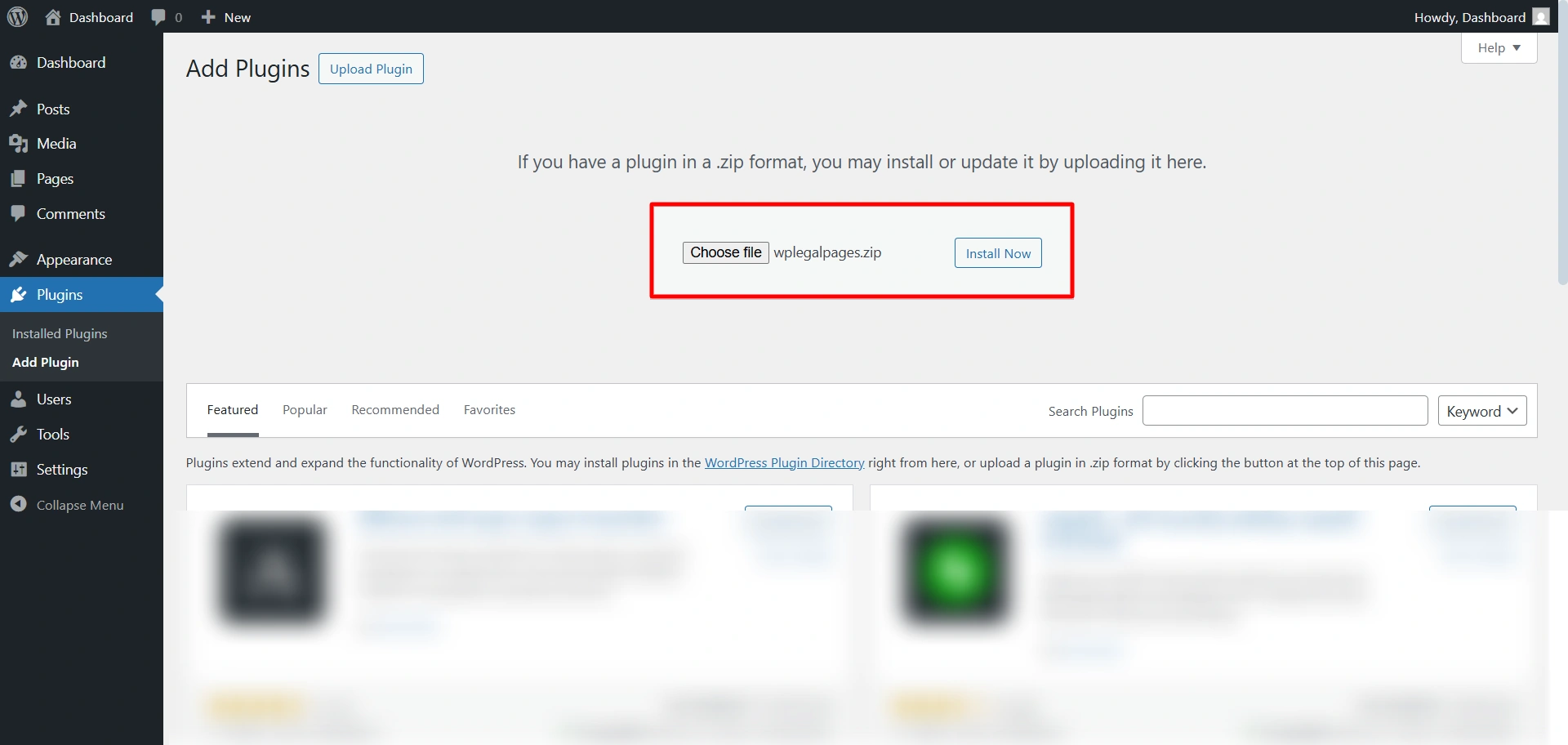
Upload the zip file

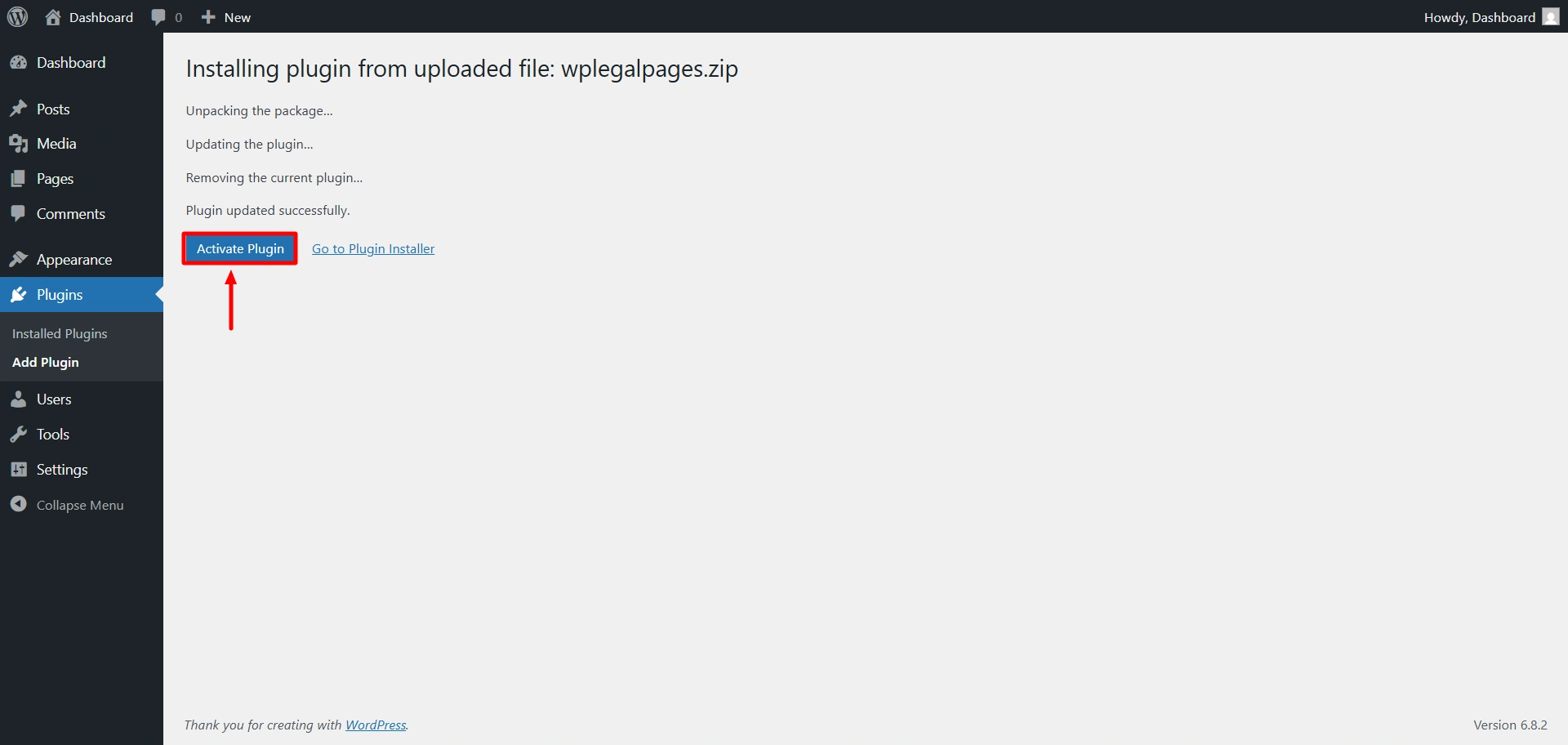
Click on the active plugin.

Activate plugin

Once activated, a new menu item called WPLegalPages will appear in your dashboard.

2. Activate the PRO Plan #

You can activate your WPLP Pro plan in two ways, depending on how you purchased it:

  • Upgraded from inside the WordPress plugin
  • Purchased directly from the WPLP website

Both methods are straightforward. Follow the steps below based on your situation.

Option 1: Upgrade to Pro from Inside the Plugin #

If you started with the free version of WPLP and want to upgrade:

Step 1: Open WPLP in Your WordPress Dashboard #

Log in to your WordPress admin area and open WP Legal Pages / WPLP Compliance Platform from the sidebar.

Step 2: Click “Upgrade” #

You’ll see an Upgrade or Upgrade to Pro option inside the plugin dashboard.
Click it to continue.
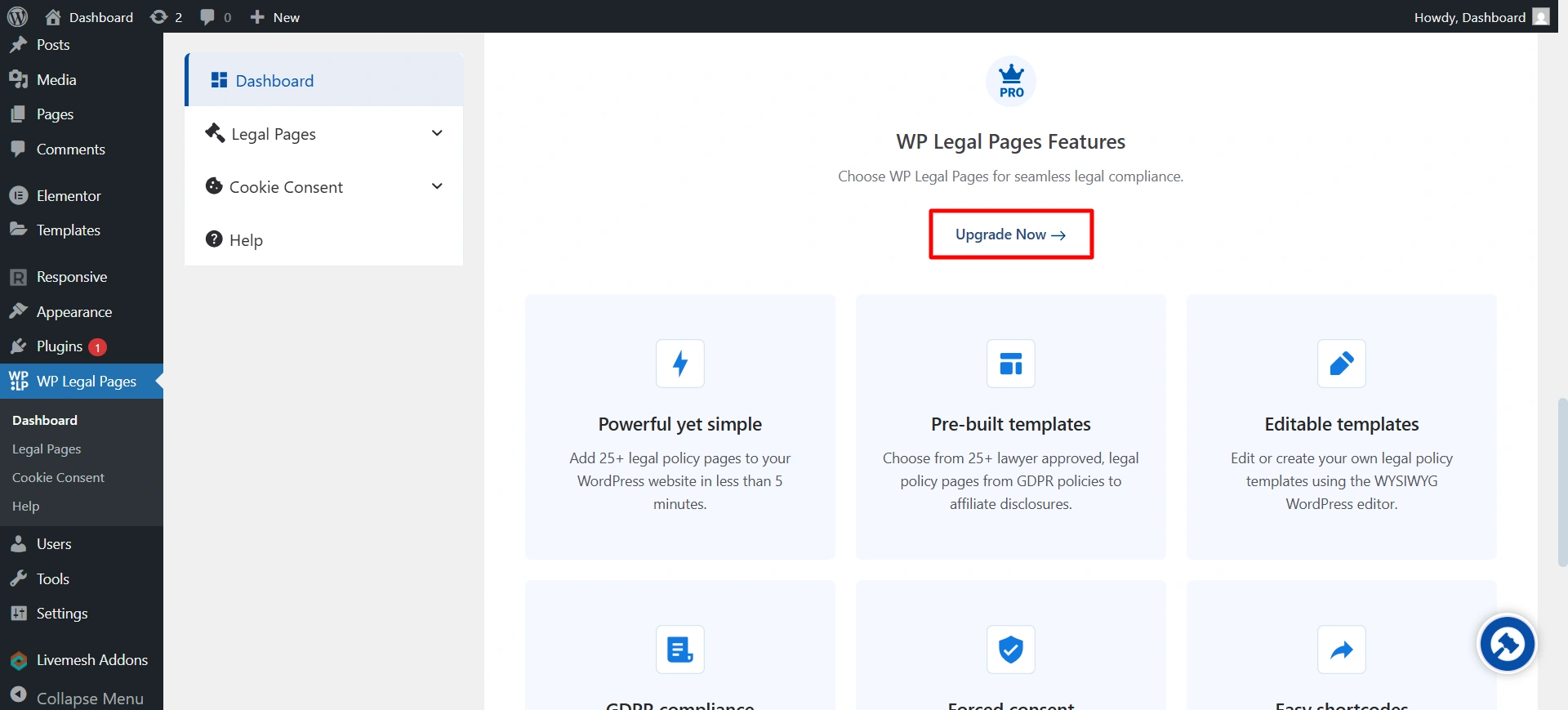
Upgrade now

Step 3: Choose a Plan #

You’ll be redirected to the WPLP pricing page.
Select the plan that fits your needs and proceed.

Step 4: Complete Checkout #

Fill in the required details on the checkout page and complete your purchase.

Once the payment is successful, your Pro features will be activated automatically for your account.

If you face any issues during checkout, reach out to us at support@wplegalpages.com.
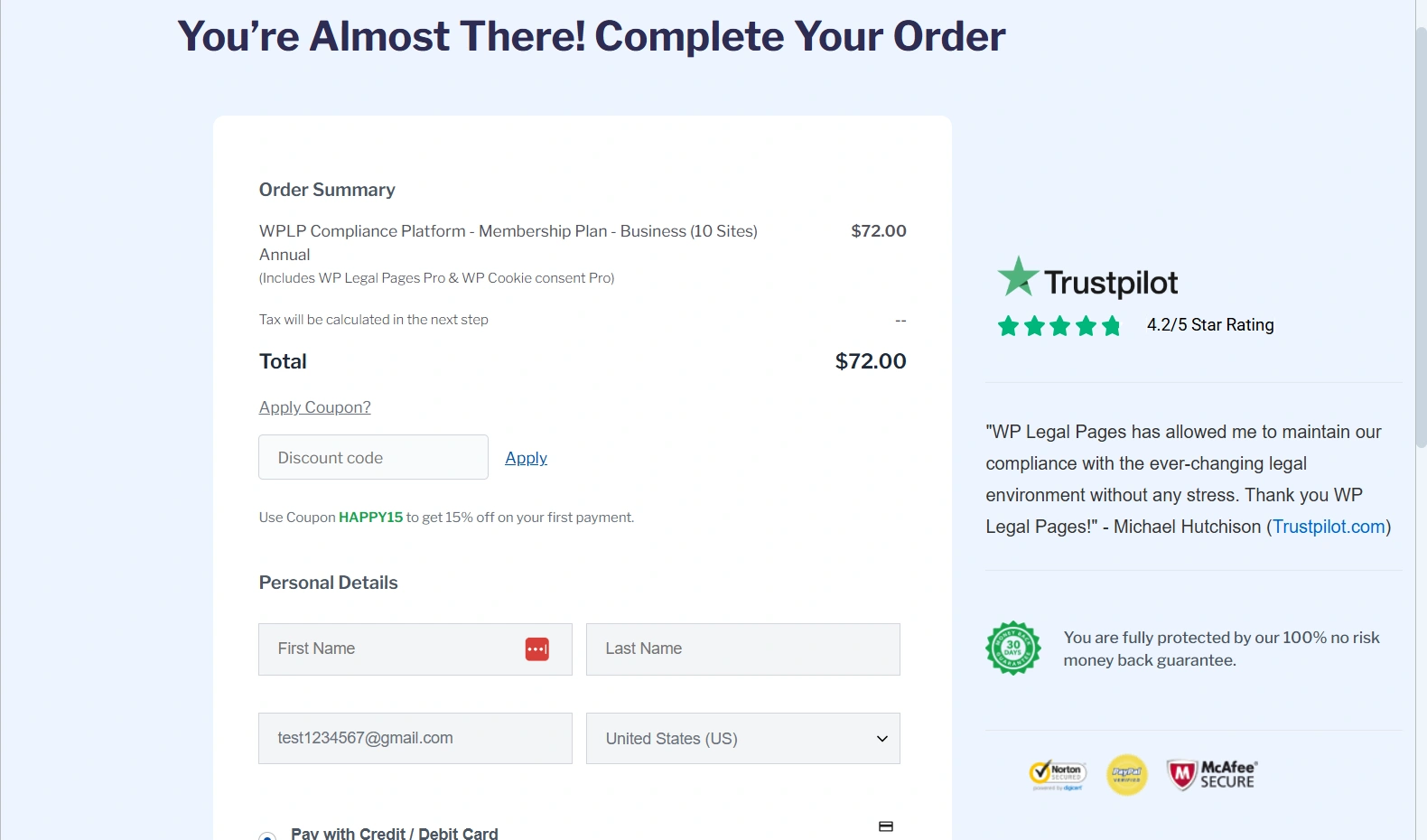
complete your purchase

Option 2: Activate Pro After Purchasing Directly from the Website #

If you already purchased a WPLP plan directly from the website (without upgrading from the plugin):

Step 1: Install Any WPLP Plugin #

Go to Plugins → Add New in your WordPress dashboard and install any WPLP plugin, such as:

  • WP Legal Pages
  • WP Cookie Consent

Activate the plugin after installation.

Step 2: Log In to Your WPLP Account #

Inside the plugin dashboard, click on the Log In button.
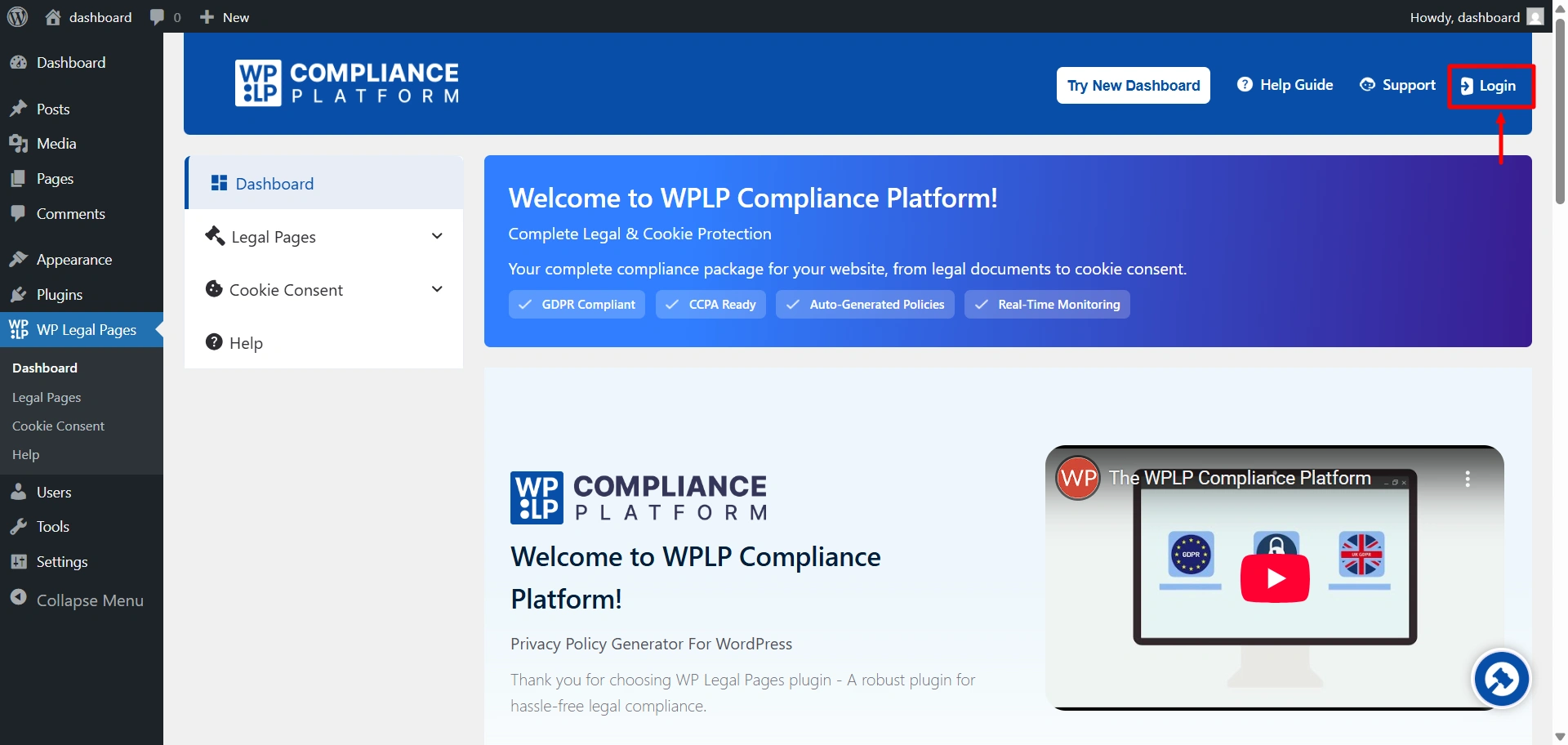
Use the same email address and password you used while purchasing the plan on the WPLP website.

Step 3: Pro Plan Activated Automatically #

Once logged in, the plugin will automatically detect your active Pro plan and unlock all Pro features—no license key required.

That’s it. Your Pro plan is now active on your site.

3. Updating to the Latest Version #

WPLP receives regular updates with bug fixes, new templates, and compliance rule changes.

To update it, go to the installed plugins option. And click on Enable auto-updates 
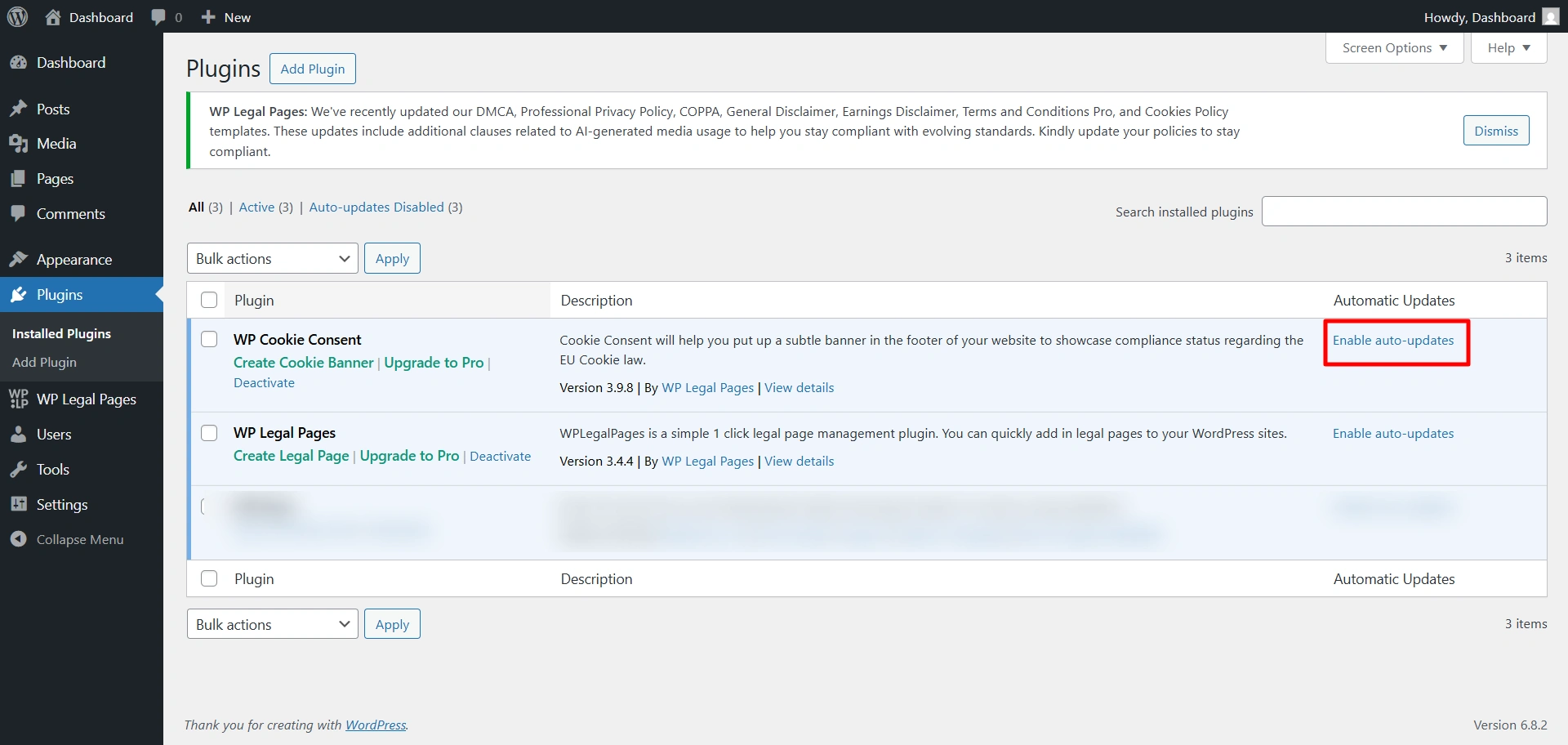
Enable auto-updates 

We strongly recommend enabling automatic updates for WPLP to ensure you never miss compliance changes.

4. Next Steps #

Once you’ve completed the setup:

  • Head to the Setup & Configuration docs for detailed banner and policy customisation.
  • Review Features Walkthrough to explore advanced options like Consent Logs, Integrations, and Auto Updates.
  • If you face issues, jump to Troubleshooting.

What are your Feelings

Share This Article :

  • Facebook
  • X
  • LinkedIn
  • Pinterest
Still stuck? How can we help?

How can we help?

Updated on December 22, 2025
Setup & Configuration
Table of Contents
  • Installation
    • 1. From WordPress Dashboard
    • 2. Manual Upload (Zip File)
  • 2. Activate the PRO Plan
    • Option 1: Upgrade to Pro from Inside the Plugin
      • Step 1: Open WPLP in Your WordPress Dashboard
      • Step 2: Click “Upgrade”
      • Step 3: Choose a Plan
      • Step 4: Complete Checkout
    • Option 2: Activate Pro After Purchasing Directly from the Website
      • Step 1: Install Any WPLP Plugin
      • Step 2: Log In to Your WPLP Account
      • Step 3: Pro Plan Activated Automatically
  • 3. Updating to the Latest Version
  • 4. Next Steps

Our Products

  • Free WP Legal Pages
  • Free WP Cookie Consent
  • Comparison
  • Responsive Theme
  • Responsive Blocks
  • Responsive Addons For Elementor

Company

  • Blog
  • Affiliate Program
  • Refund Policy
  • Privacy Policy
  • GDPR Privacy Policy
  • GDPR Cookie Policy
  • Terms of Use

Support

  • Documentation
  • Bug Bounty Program
  • Changelog
  • Contact Us
X-twitter Youtube
Copyright © 2010-2025 HB Digital Inc