WPLP Compliance Platform logo
  • Products

    Legal Pages

    Privacy Policy

    Privacy Policy

    Disclose how you collect and use user data

    Terms and conditions

    Terms and Conditions

    Set the rules for how your website is used

    Cookie policy

    Cookie Policy

    Explain how and why cookies are used on your site

    Arrow

    More Legal Policies

    Access 25+ legal page templates for compliance

    Cookie Consent

    Cookie scanner

    Cookie Scanner

    Scan and categorize cookies used on your website

    Consent management platform

    Consent Management Platform

    Collect, manage, and log user consent easily

    Google Consent Mode

    Google Consent Mode

    Maintain ad tracking while respecting user privacy

    IAB TCF 2.2

    IAB TCF 2.2

    Ensure your site meets the latest ad consent standards

    Data Subject Access Request

    Data Subject Access Request

    Let users request access or deletion of their data

    Arrow

    All Features

    Explore every feature included in our cookie consent solution

  • Privacy Laws

    USA

    California icon

    California

    California Consumer Privacy Act (CCPA)

    Virginia icon

    Virginia

    Virginia Consumer Data Protection Act (VCDPA)

    Connecticut icon

    Connecticut

    Connecticut Data Privacy Act (CTDPA)

    Utah icon

    Utah

    Utah Consumer Privacy Act (UCPA)

    Colorado icon

    Colorado

    Colorado Privacy Act (CPA)

    Neveda icon

    Neveda

    Nevada Privacy Law

    EU / Worldwide Laws

    European Union icon

    European Union

    General Data Protection Regulation (GDPR)

    UK GDPR icon

    UK GDPR

    United Kingdom (Post-Brexit version of GDPR)

    European Union icon

    European Union

    ePrivacy Directive (ePD)

    Brazil (Worldwide) icon

    Brazil (Worldwide)

    Lei Geral de Proteção de Dados (LGPD)

  • Pricing
  • Resources
    How to guide icon

    How-to Guides

    • Generate Privacy Policy
    • Generate Cookie Policy
    • Generate Terms & Conditions
    • Generate Return & Refund Policy
    • Add Cookie Banner
    • Setup Google Consent Mode v2
    Articles icon

    Articles

    Learn privacy compliance best practices, tips and industry updates.

    Documentation icon

    Documentation

    Step-by-step guides to help you install, configure and master WPLP features

    Support icon

    Support

    Need help? Contact our support team for assistance

Login
Get Started

Documentation

Find step-by-step guides, tutorials, and FAQs for all our latest plugins.

Getting Started

  • Upgrading To Pro Version of WP Cookie Consent Plugin
  • Installing and Creating Free Account With WP Cookie Consent
  • Dashboard
  • Setup Wizard
  • Usage of Cookie Consent Plugin
  • Overview of the Plugin
  • Which Websites need to be GDPR and CCPA Compliant?
  • What are GDPR and CCPA?
  • Introduction to WPLegalPages

Configurations

  • Upgrading To The Pro Version of WP Legal Pages Plugin
  • Installing WP Legal Pages Plugin And Create a Free Account
  • Accepting WPLegalPages Terms of Use
  • Configuring the Settings
  • Compliances Settings

How-To Guides

  • How to Add Custom CSS to WP Cookie Consent Banner
  • Setup Cookie Banner Language

Video Guides

  • Video Resources
  • Video Guides

FAQs

  • WP Cookie Consent – FAQ
  • WP Legal Pages – FAQ
  • Additional Resources

Settings

  • Renew User Consent
  • ePrivacy Settings
  • ePrivacy Overview
  • Integrating Your Actions with CCPA
  • CCPA Settings
  • CCPA Settings -Overview
  • Consent Logging
  • Policy Data
  • Integrating Your Actions
  • GDPR Settings -Script Blocker
  • GDPR Settings

Migration

  • Seamless Migration to the New WP Legal Pages Compliance Platform

Overview

  • Getting Started
  • Setup & Configuration
  • Platform Overview

Features Walkthrough

  •  Cookie Consent
  • Legal pages
  • Dashboard

Guides

  • What is the Right to Access?
  • What is the Right to be Forgotten
  • How To Schedule Automatic Cookie Scan
  • A/B Testing Feature
  • Implementing Google Consent V2 Mode using WPLP Compliance Platform
  • Google Consent Mode Troubleshooting with WPLP Compliance Platform
  • How to Verify if Google Consent Mode is Properly Implemented
  • Right to Data Portability Explained – What It Means & How to Comply
  • How to use Script Blocker
  • Respect Do Not Track & Global Privacy Control
  • How to show Third-Party Policy Data on Your Website
  • How to Enable DSAR
  • How to create an Affiliate Disclosure Page
  • How to show the WPLP Block in Gutenberg.
  • How to Make an Announcement Banner for Legal Pages
  • How to Show Age Verification Pop-up on The Website
  • How to add Legal Page in Footer
View Categories
  • Home
  • Docs
  • Configurations
  • Configuring the Settings

Configuring the Settings

This feature is a one-time setup. The details that you enter here will be used to generate customized legal pages. Check out the video at the end of the page to learn more.

This feature is a one-time set-up. The details that you enter here will be used to generate customized legal pages.

The settings page has General, Advanced, Compliance, and Shortcodes tabs in the free version and an additional Data tab along with the other tabs in the Pro version.

General #

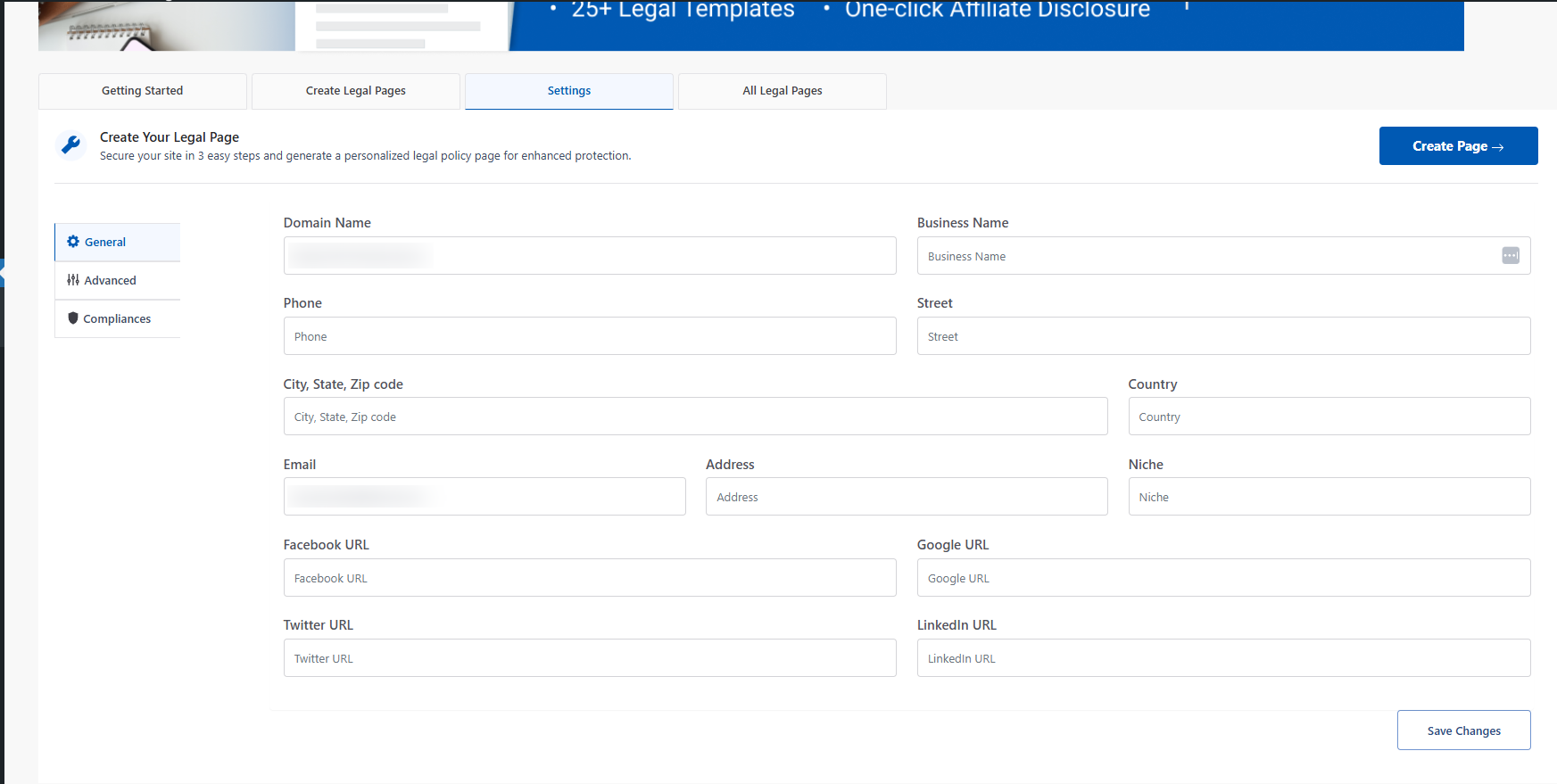
This business data is captured in the General tab of the Settings page. You need to enter the following information on this page:

  • Domain Name of your website
  • Business Name
  • Phone number
  • Street number
  • City
  • State
  • ZIP code
  • Country
  • Email Address
  • Full mailing address
  • Niche of your website
  • Social Media URLs (pro settings)
general Setting

Advanced #

Some of the advanced settings displayed here are:

  • Give Credit – This will display credit at the bottom of the legal pages.
  • Allow Usage Tracking – Allow non-sensitive usage tracking to help us provide improved features and faster fixes. No personal data is tracked or stored.
  • Show legal pages in search– This will enable website users to search your legal pages using your website search. If you don’t want to make your legal pages searchable, disable it.
  • Affiliate Disclosure – If you have an affiliate site, you can add an affiliate disclosure right from your WordPress post editor. The document further explains how to add affiliate disclosure on a website.
  • Adult Content Site – If you have an adult content site, enabling this will enable a popup on your site asking you to confirm your age.

Privacy Policy Page – Select the page that describes what personal data is captured (Usually your Privacy Policy Page). Check the FAQ section for detailed information to integrate with different plugins.

Once you’ve provided all the details, click on Save Changes.
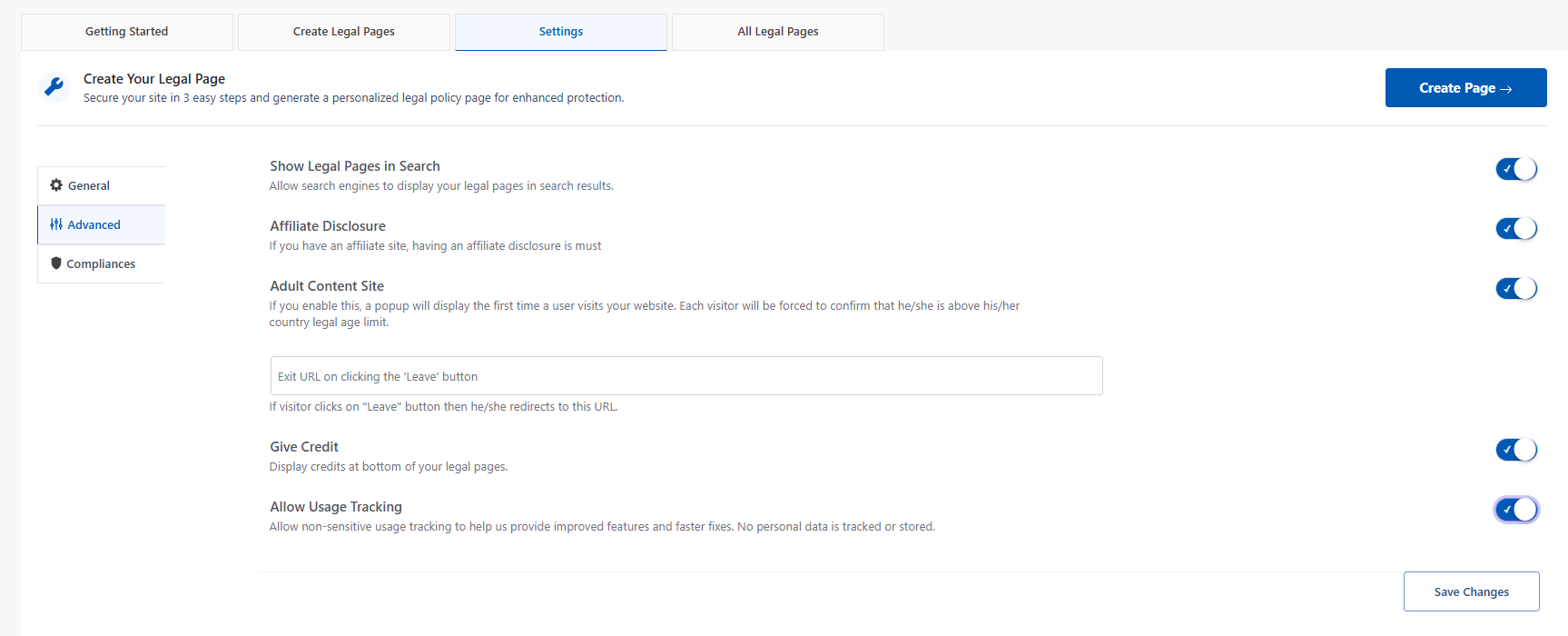
Advanced settings tab

Compliances #

The Compliance Settings Tab has a set of useful settings that can help you with certain legal requirements. WPLegalPages has five compliance settings options:

  • Add Legal Pages links to the footer
  • Announcement banner for legal pages
  • Cookie bar
  • Add age verification popup
  • Create popups

Read about how to configure these settings on the Compliances Settings page.
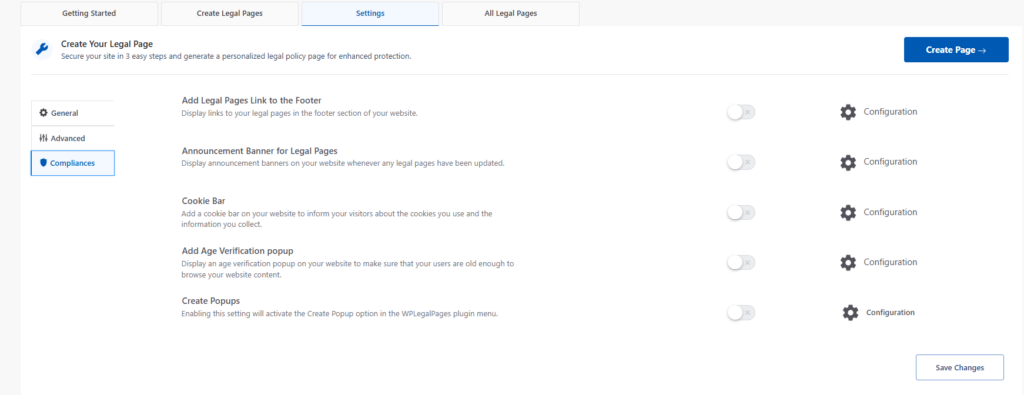
Compliance tab

#

What are your Feelings

Share This Article :

  • Facebook
  • X
  • LinkedIn
  • Pinterest
Still stuck? How can we help?

How can we help?

Updated on December 4, 2024
Table of Contents
  • General
  • Advanced
  • Compliances

Our Products

  • Free WP Legal Pages
  • Free WP Cookie Consent
  • Comparison
  • Responsive Theme
  • Responsive Blocks
  • Responsive Addons For Elementor

Company

  • Blog
  • Affiliate Program
  • Refund Policy
  • Privacy Policy
  • GDPR Privacy Policy
  • GDPR Cookie Policy
  • Terms of Use

Support

  • Documentation
  • Bug Bounty Program
  • Changelog
  • Contact Us
X-twitter Youtube
Copyright © 2010-2025 HB Digital Inc