WPLP Compliance Platform logo
  • Features

    Legal Policy Generator

    Privacy Policy

    Privacy Policy

    Disclose how you collect and use user data

    Terms and conditions

    Terms and Conditions

    Set the rules for how your website is used

    Cookie policy

    Cookie Policy

    Explain how and why cookies are used on your site

    Arrow

    More Legal Policies

    Access 25+ legal page templates for compliance of data privacy laws

    Cookie Consent Management

    Cookie scanner

    Cookie Scanner

    Scan and categorize cookies used on your website

    Consent management platform

    Consent Management Platform

    Collect, manage, and log user consent easily

    Google Consent Mode

    Google Consent Mode

    Maintain ad tracking while respecting user privacy

    IAB TCF 2.2

    IAB TCF 2.3

    Ensure your site meets the latest ad consent standards

    Data Subject Access Request

    Data Subject Access Request

    Let users request access or deletion of their data

    Arrow

    Advanced Features

    All the features required to keep your website compliant with cookie laws

  • Privacy Laws

    USA

    California icon

    California

    California Consumer Privacy Act (CCPA)

    Virginia icon

    Virginia

    Virginia Consumer Data Protection Act (VCDPA)

    Connecticut icon

    Connecticut

    Connecticut Data Privacy Act (CTDPA)

    Utah icon

    Utah

    Utah Consumer Privacy Act (UCPA)

    Colorado icon

    Colorado

    Colorado Privacy Act (CPA)

    Neveda icon

    Neveda

    Nevada Privacy Law

    EU / Worldwide Laws

    European Union icon

    European Union

    General Data Protection Regulation (GDPR)

    UK GDPR icon

    UK GDPR

    United Kingdom (Post-Brexit version of GDPR)

    European Union icon

    European Union

    ePrivacy Directive (ePD)

    Brazil (Worldwide) icon

    Brazil (Worldwide)

    Lei Geral de Proteção de Dados (LGPD)

  • Pricing
  • Resources
    How to guide icon

    How-to Guides

    • Generate Privacy Policy
    • Generate Cookie Policy
    • Generate Terms & Conditions
    • Generate Return & Refund Policy
    • Add Cookie Banner
    • Setup Google Consent Mode v2
    Articles icon

    Articles

    Learn privacy compliance best practices, tips and industry updates.

    Documentation icon

    Documentation

    Step-by-step guides to help you install, configure and master WPLP features

    Support icon

    Support

    Need help? Contact our support team for assistance

Login
Try for Free

Video Guides

2
View Categories
  • Home
  • Docs
  • Guides
  • How to Make an Announcement Banner for Legal Pages

How to Make an Announcement Banner for Legal Pages

You can see the notification only if you have made any changes to your legal page. 

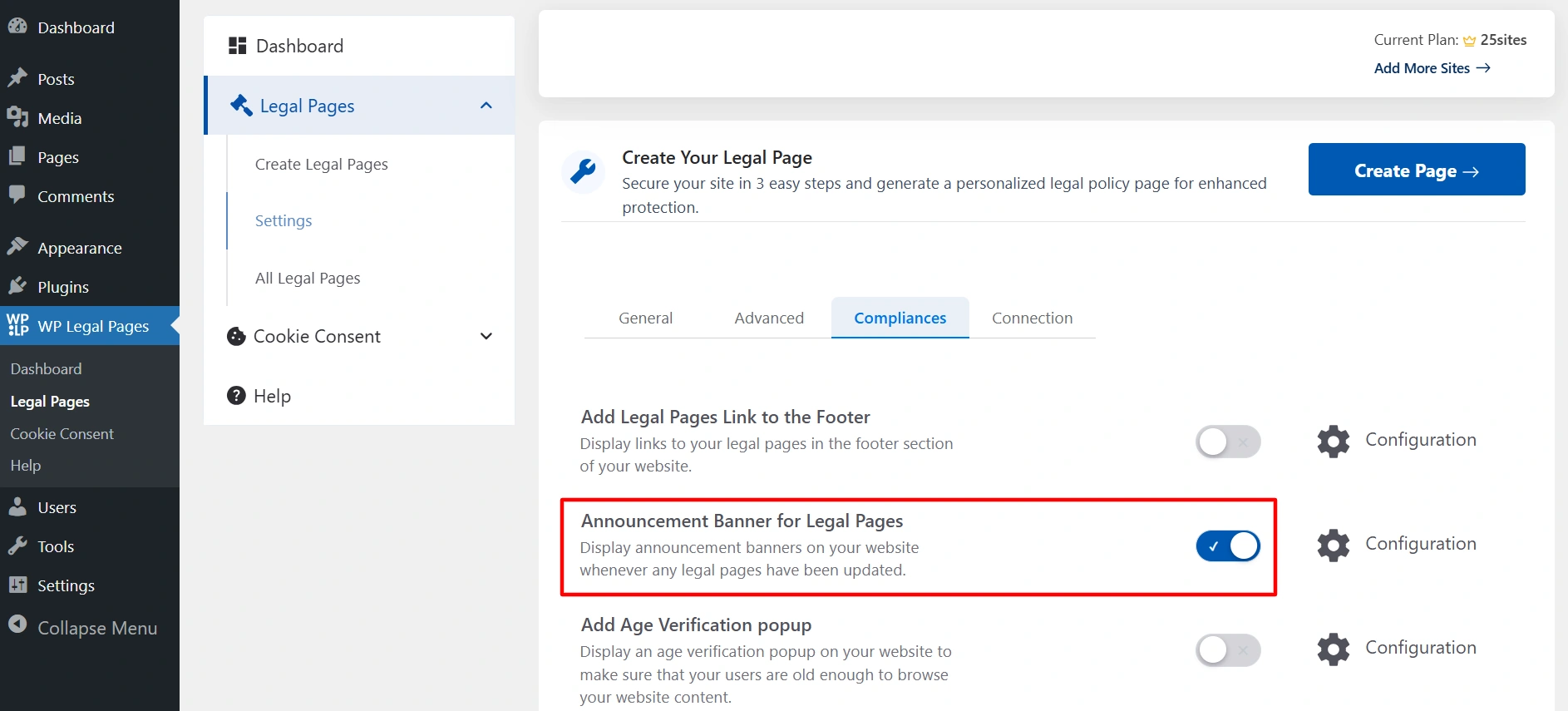
Navigate to your WordPress dashboard, and click on Legal Pages > Settings > Compliance.
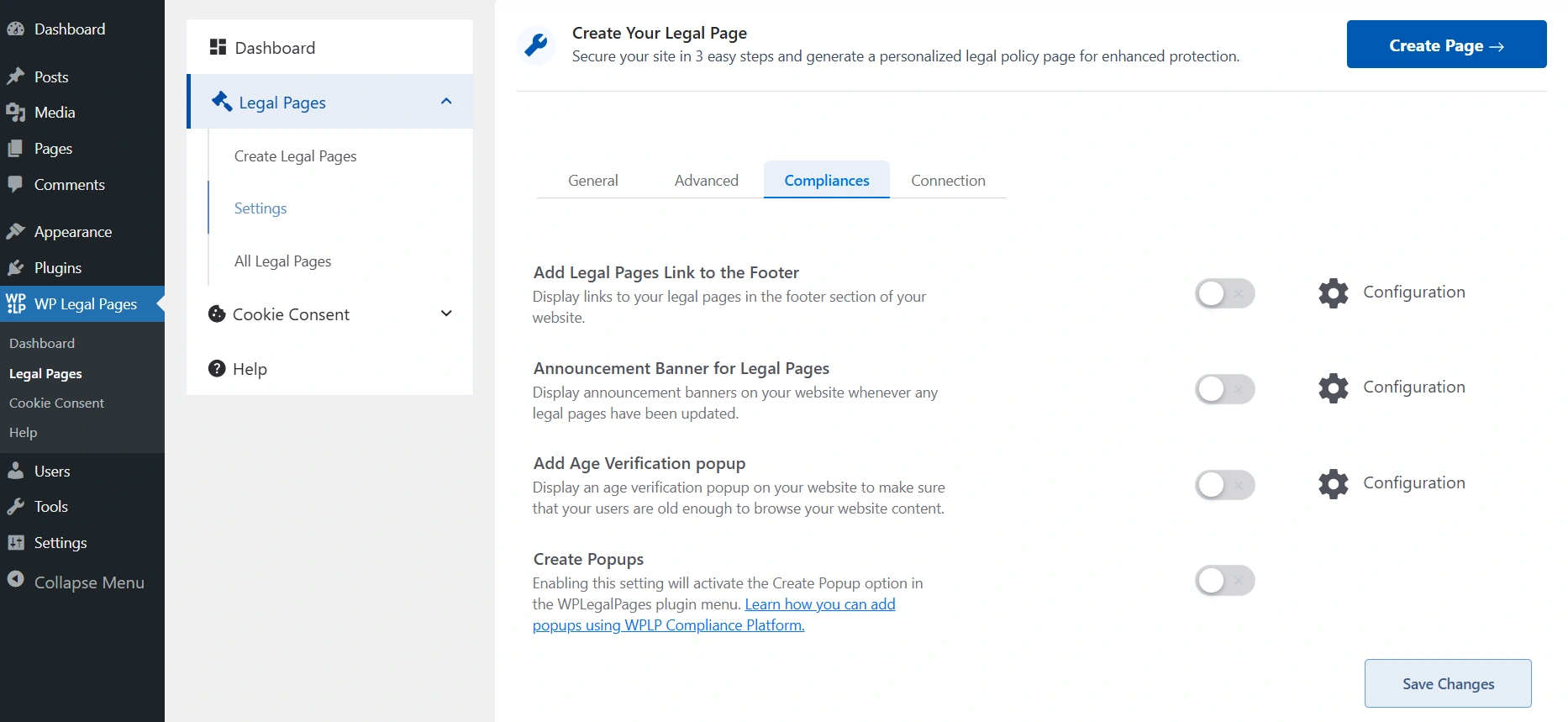
Legal page compliance

Switch on the toggle.

Announcement banner toggle on

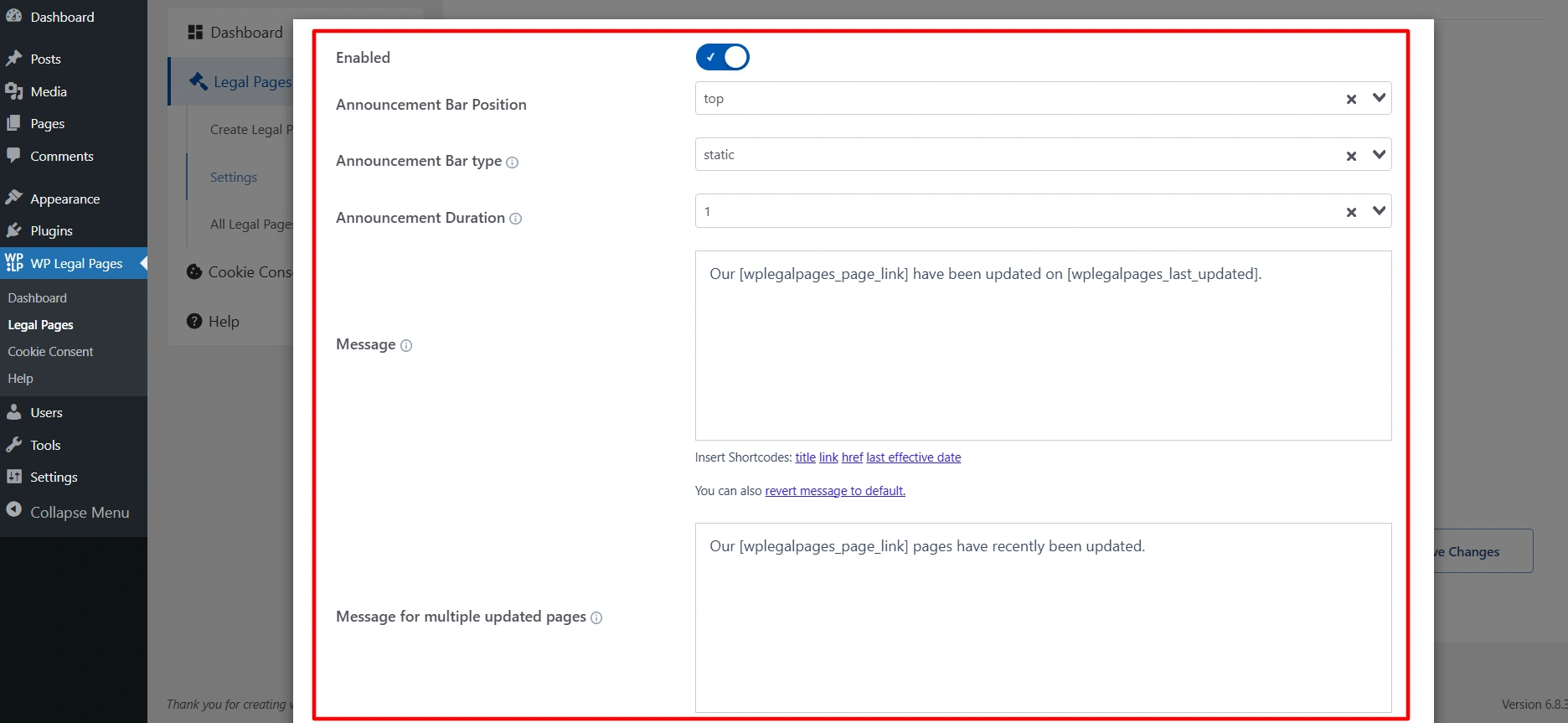
Announcement Banner Settings

Announcement banner settings
  • Enabled:  Toggle to turn the announcement bar on or off. 
  • Announcement Bar Position: Defines where the bar will appear on the page.
  • Announcement Bar Type: Controls how the banner behaves on scroll. If you select fixed that means it stays visible even after scrolling, and if you choose static, that means when you scroll, it will go away.
  • Announcement Duration: Sets how long (in days) the announcement bar remains visible.
  • Message: The actual text displayed in the banner.
  • Message for multiple updated pages: If several legal pages are updated at once, this message is shown instead of the single-page message.
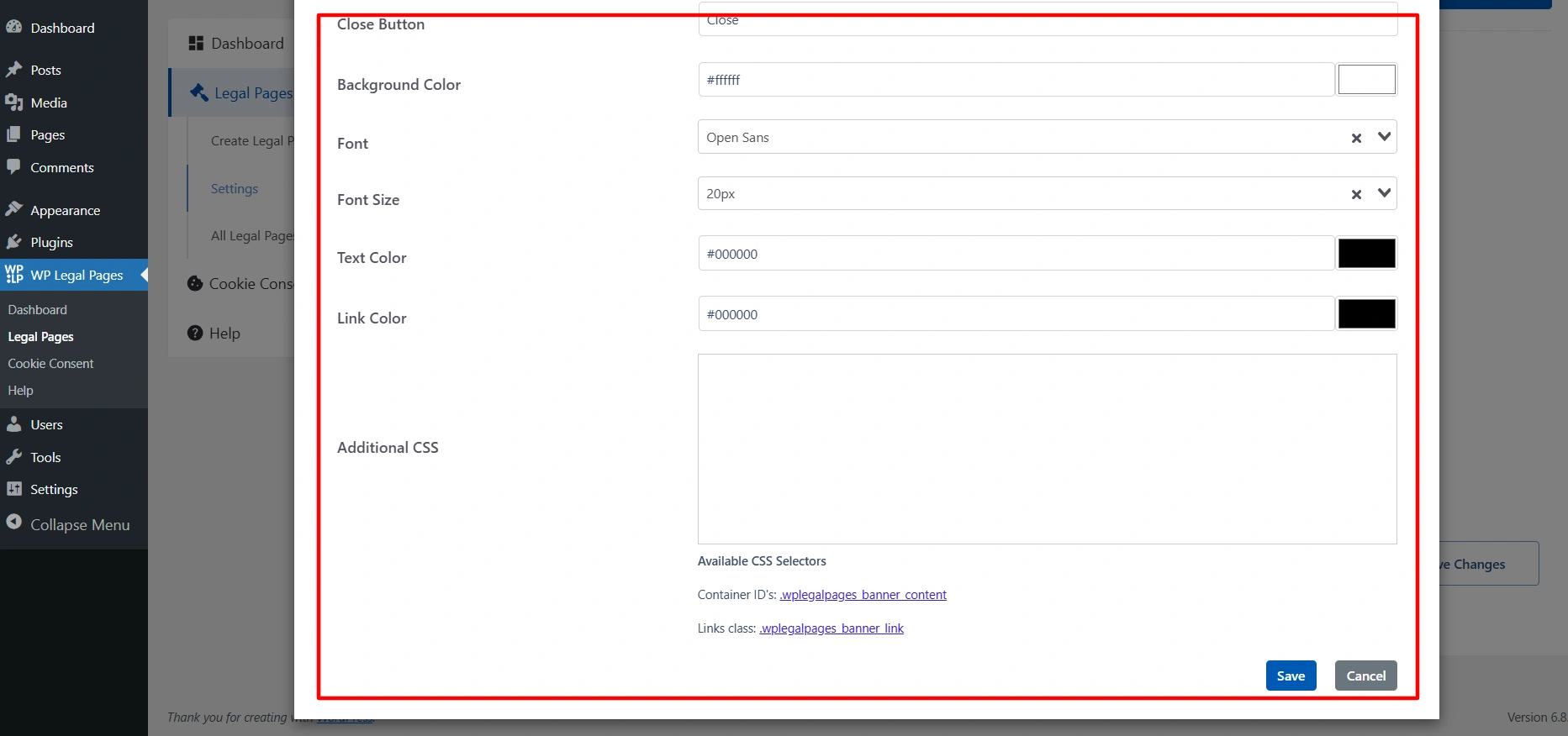
What are announcement banner settings
  • Close Button: Lets you customize the text for the close button (e.g., “Close” or “Dismiss”).
  • Background Color: Choose the background color of the banner.
  • Font: Select the font style for the banner text.
  • Font Size: Sets the size of the announcement text (in px).
  • Text Color: Sets the text color.
  • Link Color: Sets the color for any links inside the announcement text.
  • Additional CSS: Field for custom CSS rules if you want more styling flexibility.

Updated on November 19, 2025

What are your Feelings

  • Happy
  • Normal
  • Sad

Share This Article :

  • Facebook
  • X
  • LinkedIn
  • Pinterest
How to show the WPLP Block in Gutenberg.How to Show Age Verification Pop-up on The Website

Our Products

  • Free WP Legal Pages
  • Free WP Cookie Consent
  • Comparison
  • Responsive Theme
  • Responsive Blocks
  • Responsive Addons For Elementor

Company

  • About Us
  • Blog
  • Affiliate Program
  • Refund Policy
  • Privacy Policy
  • GDPR Privacy Policy
  • GDPR Cookie Policy
  • Terms of Use

Support

  • Documentation
  • Bug Bounty Program
  • Changelog
  • Contact Us
IAB CMP Logo
Google Certified CMP Badge
Visa logo
Mastercard logo
Amex digital logo
Apple pay logo
Apple pay logo - 2
Google pay logo
X-twitter Youtube Instagram
Copyright © 2010-2026 HB Digital Inc

We value your privacy

This website uses cookies to improve your experience. We'll assume you're ok with this, but you can opt-out if you wish. Read More

Accept All Decline Cookie Settings
Cookies are small text files that can be used by websites to make a user's experience more efficient. The law states that we can store cookies on your device if they are strictly necessary for the operation of this site. For all other types of cookies we need your permission. This site uses different types of cookies. Some cookies are placed by third party services that appear on our pages.
  • Necessary
    Always Active
    Necessary cookies help make a website usable by enabling basic functions like page navigation and access to secure areas of the website. The website cannot function properly without these cookies.

  • Marketing
    Marketing cookies are used to track visitors across websites. The intention is to display ads that are relevant and engaging for the individual user and thereby more valuable for publishers and third party advertisers.

  • Analytics
    Analytics cookies help website owners to understand how visitors interact with websites by collecting and reporting information anonymously.

  • Preference
    Preference cookies enable a website to remember information that changes the way the website behaves or looks, like your preferred language or the region that you are in.

  • Unclassified
    Unclassified cookies are cookies that we are in the process of classifying, together with the providers of individual cookies.

  • Preferences
    Preference cookies enable a website to remember information that changes the way the website behaves or looks, like your preferred language or the region that you are in.