Summary
You’ll learn what geo targeting means, why it matters for global traffic, and when it makes sense to split cookies by region. You’ll also see how WPLP makes this easy with tools that detect visitor location and show correct consent rules.
By the end, you’ll clearly know how to stay compliant, protect user trust, and manage cookies in the cleanest and simplest way.
Cookie banner geo-targeting may sound technical to your ears, but it’s actually very simple. It just helps you show the right consent message to people based on the region they live in.
If your site gets global traffic, the rules are never the same. One message cannot serve every visitor. This is because every region has its own law. Each law expects a different way of asking for cookie consent.
Today, the web is global. A site can get traffic from India, the US, the EU, and the UK on the same day. So you need the correct rules in the correct region. If not, there’s a huge risk of a fine or worse, loss of trust.
In this blog, you’re going to learn why geo-targeting is important. Then, you’re going to learn the best time to split cookies by region. Also, how to do it the smart way. In the end, you’re going to see how WPLP makes this setup easy for you.
What Geo-Targeting Means in Cookie Compliance
Geo-targeting is a simple idea. It means the system learns the visitor’s location. Then it shows a cookie banner that matches the rules of that region.
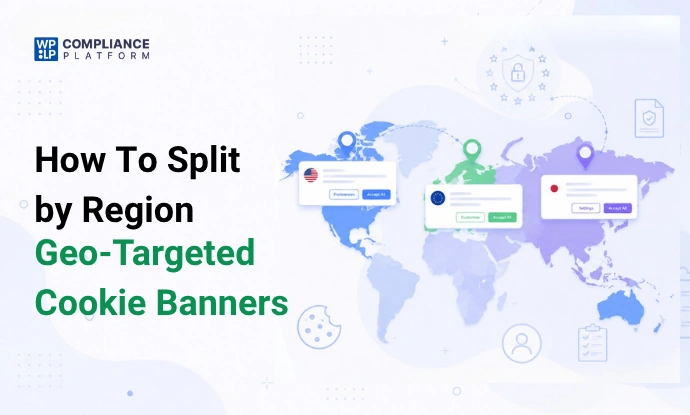
You can understand it this way: A visitor in the EU sees a strict consent banner. A visitor in the US may see a toned-down version of the same. While a user in Brazil or Canada sees another version based on their law.
The system in the backend uses the IP address of a user to identify their location. After that, the cookie banner loads based on the rule that matches the regional cookie compliance needs. So every visitor gets the correct message without any effort from your end.
This process is very useful. It keeps the site safe while still protecting tracking and analytics data. It also builds trust because the message feels local and relevant. A generic banner can feel strange or confusing. A geo-targeted cookie banner feels clear and fair.
Every passing day, the need for region-based cookie consent is rising. The laws in the EU and the UK are strict. The US has state rules like California & Colorado. Brazil has LGPD, whereas Canada has its own rules. Also, the APAC asks for basic notice in many cases.
Your cookie banner is obligated to cater to all of them. Let’s look at the next section, which explains why cookie banner geo-targeting is actually important for your business.
Why Geo-Targeting Matters for Privacy Laws
By now, you must have understood that laws aren’t the same across the world. EU rules need full consent before any tracking cookie starts. US rules give more control to the visitor. The visitor can opt out. Canada has its own level of control. Brazil also expects strong consent care.
So, if you show the same banner in every region, you risk many problems. A strict banner in a relaxed region hurts user experience. A soft banner in the EU creates legal risk. This simple mistake can lead to lost trust. It may also impact analytics and ad tracking.
Many businesses use pixels and scripts for retargeting or reports. If these load before the correct consent, that can be a legal risk. Showing the wrong banner also lowers the consent rate. A visitor may feel confused or annoyed.
So, the idea of splitting cookies by region is legal. Also, you can say it’s a way to improve marketing and build trust in users. A region-based cookie consent setup always feels clear and, yes, also respectful.
This is why platforms like WPLP Compliance make geo-targeting simple. In the coming section, let’s see in more detail how and when you should set it up.
When You Should Split Cookies by Region
Let’s look at the real cases where splitting cookies by region makes sense.
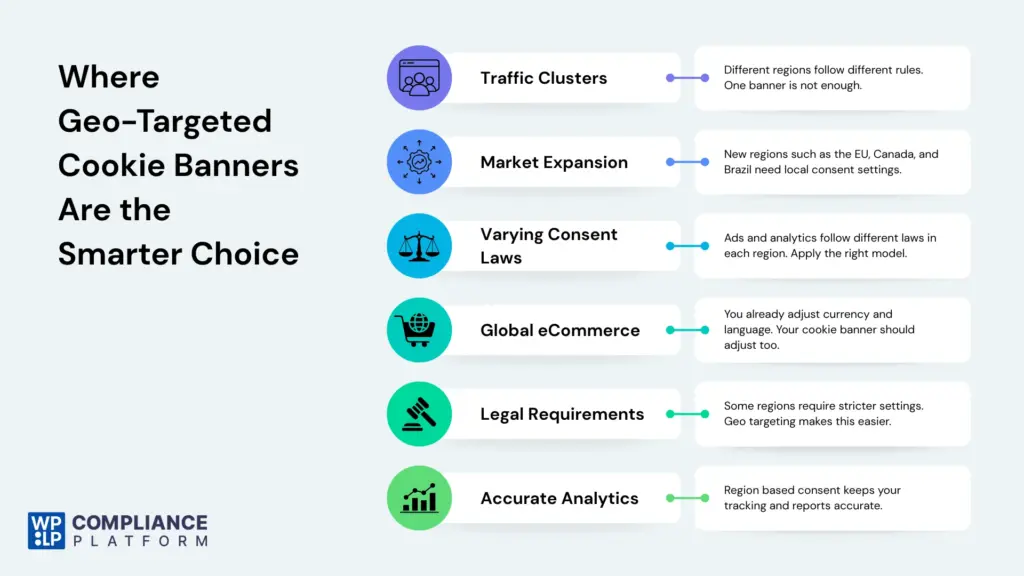
- When your site has clear traffic clusters in different regions, the first thing you should do is split cookies by region. It’ll help show rules that match each area.
- Many businesses start small and then gradually grow into the new and bigger markets. Maybe you started with the US market, but now, when you check the analytics, you find out that the visitors have also started coming from regions such as the EU, Canada, and Brazil.
At this point, you should realize that a simple cookie banner of yours no longer does the job. Here’s where the geo-targeted cookie banner comes in and keeps things clean. - If you run ads, analytics, or pixel-based tracking, this setup can certainly help a lot. You see, some regions allow tracking after consent, others allow tracking unless a user opts out, and some only need a soft notice. Here, this region-based cookie consent makes this feel natural instead of messy.
- Online eCommerce stores can also see a clear benefit in it. If you’ve a global reach for your store, you must have already set up the currency and language catering to the local needs. It should only make sense when you do the same for cookie banners.
- There are also so many cases showing that a legal team wants stricter rules in one region and not so strict ones in another. The best thing as a website or a business owner you can do is to make use of geo-targeting, instead of writing custom logic or using multiple tools, split cookies by region. Let the system do the work for you.
- If your tools store or process data in many places, split cookies by region so you can prove that consent was given before tracking started. Product and marketing teams that test funnels also find value here. Clean tracking means cleaner reports.
How to Set Up Region-Based Cookie Banner Using WPLP Compliance Platform
WPLP Compliance Platform has a cookie banner geo-targeting feature built in. Once it’s active, it detects the visitor region using the IP address and then loads the correct consent level.
This means you no longer guess what each visitor must see. The system does it for you.
Let’s look at the step-by-step setup of the geo-targeted cookie banner using the WPLP Compliance Platform:
Step 1: Installing WP Cookie Consent Plugin in Your WordPress Dashboard
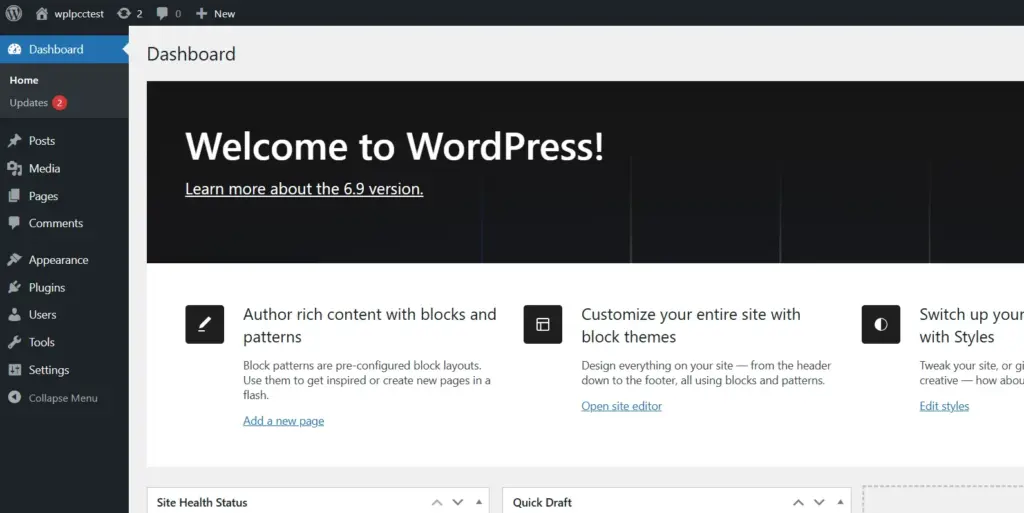
Firstly, open your wordpress dashboard.
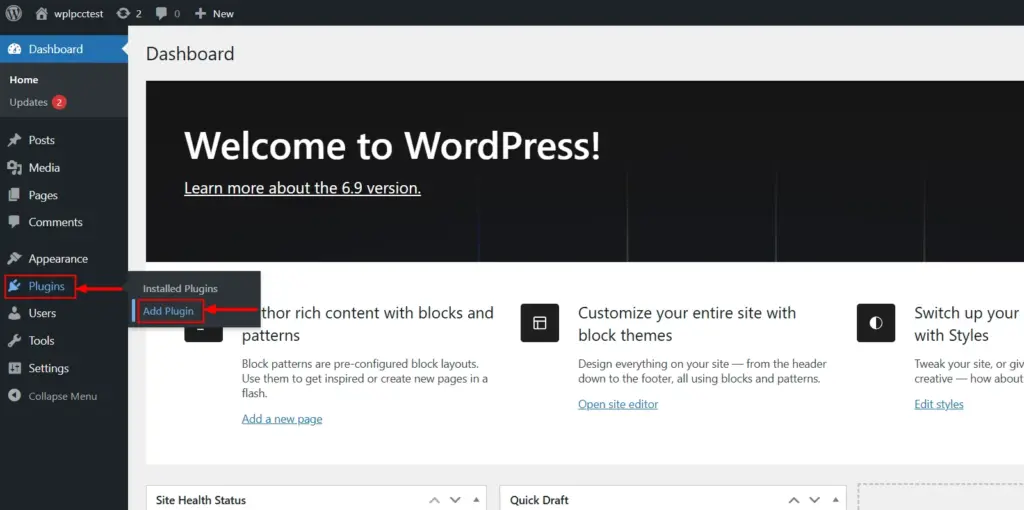
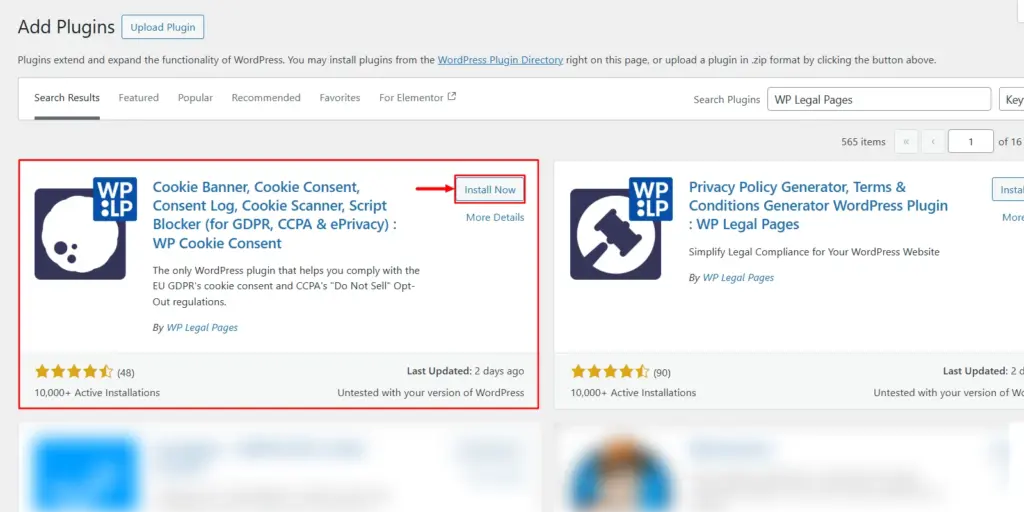
Then, go to Plugins > Add Plugin
In the ‘Search Plugins’ search bar, search for ‘WP Legal Pages.’
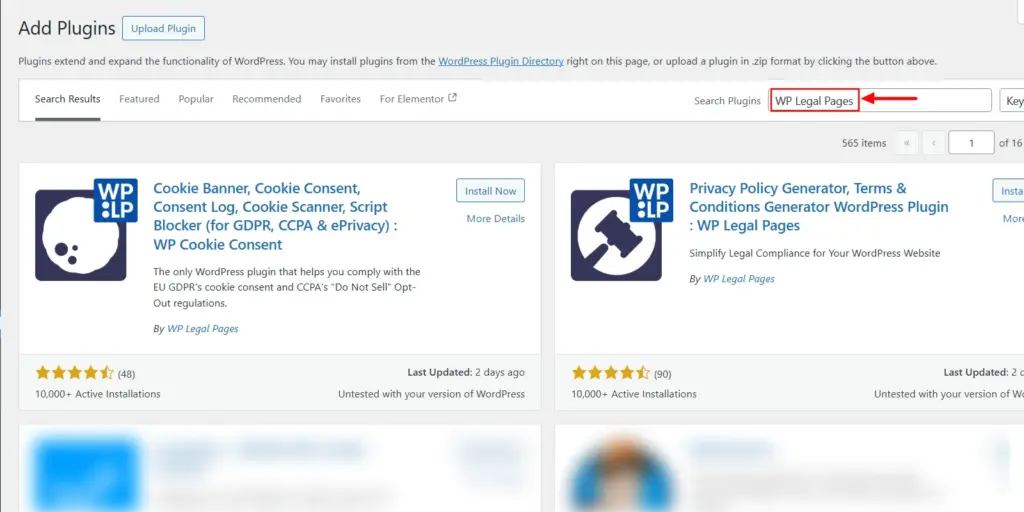
Now, look for WP Cookie Consent in the archives. You will most probably find it in the first row itself. Click on the ‘Install Now’ button.
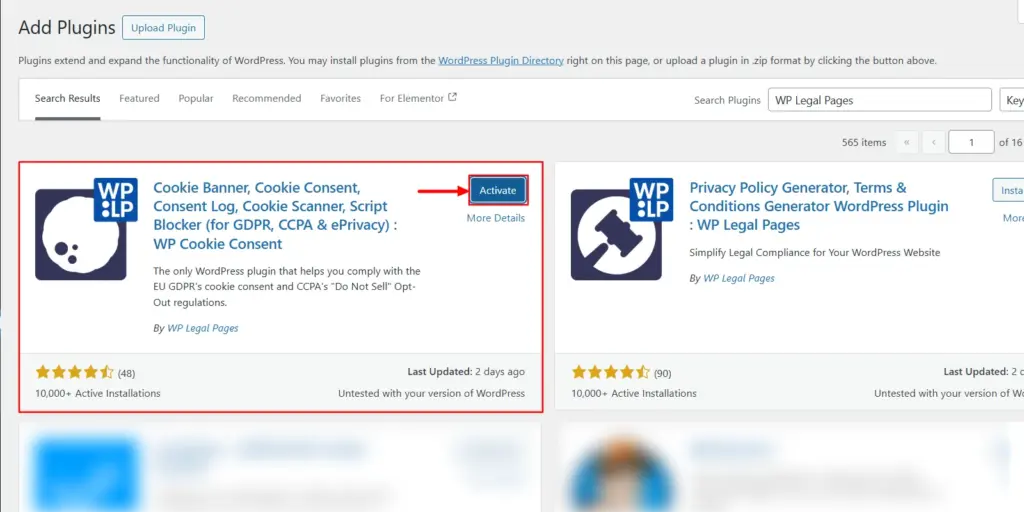
Once you click on it, you can now see the ‘Activate’ button. Click on that too. You’ll then be redirected to the WP Cookie Consent dashboard.
Step 2: Signing Up and Connecting With Your Site
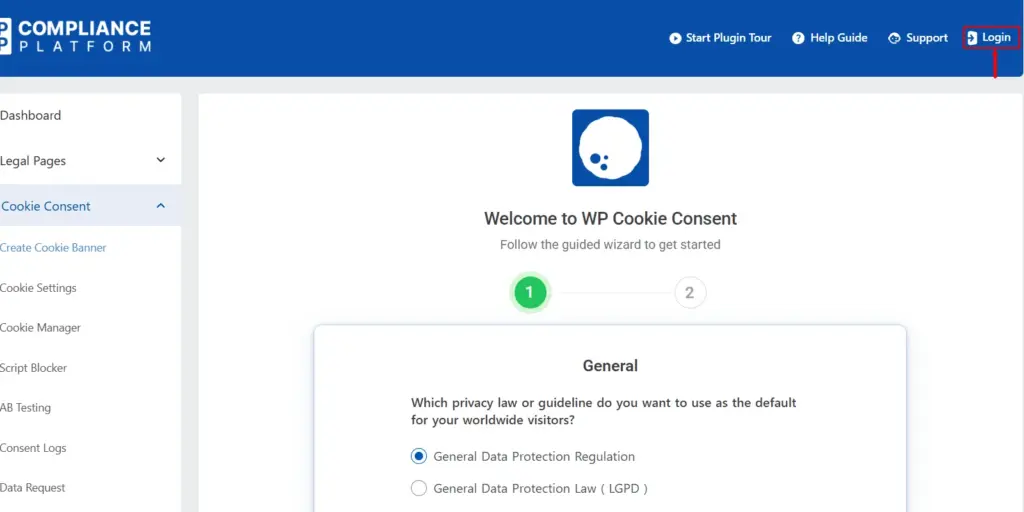
The real setup of a cookie banner begins here. You’ll come across a guided wizard; you just have to follow the instructions clearly, and you’ll have yourself a fully functioning cookie banner for your site.
Now, click on the ‘login’ button and sign up with your email address, if you don’t already have one. If you have one, just log in with your existing credentials.
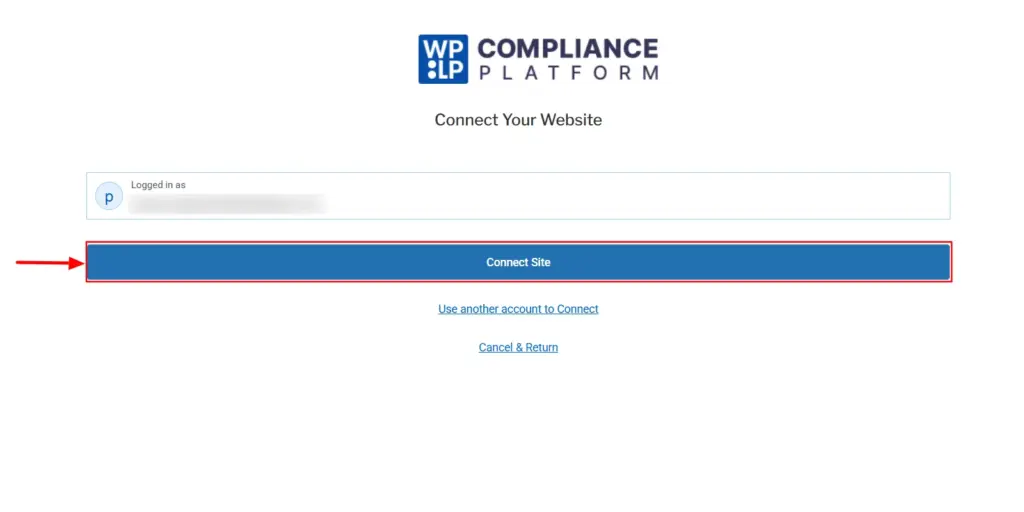
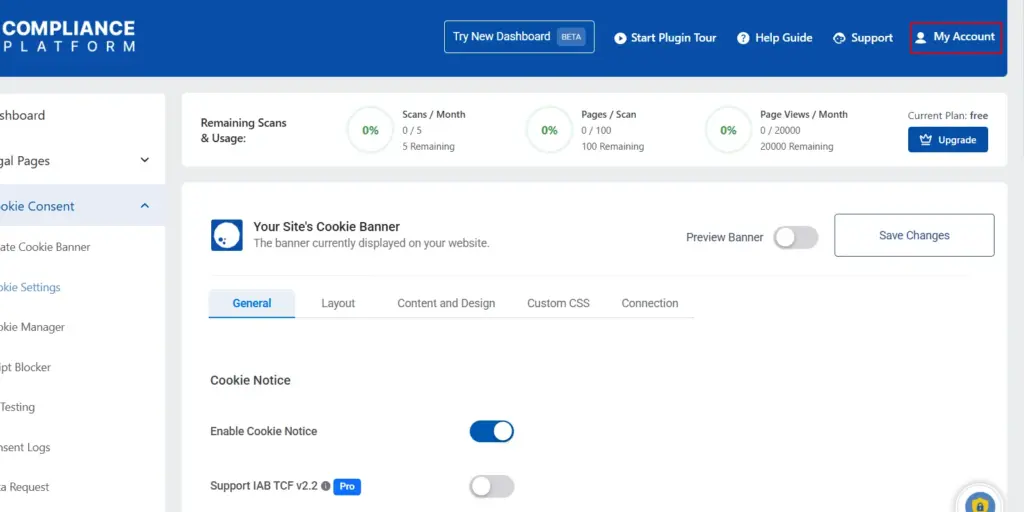
After signing up, you will be asked to connect your site; click on the ‘Connect Site’ button as shown below.
Then you can see the login button turn into ‘My Account’. This means your site is connected successfully. From here on, whatever changes you make in the dashboard will start reflecting in the live site.
Step 3: Exploring the Pricing Options in the WPLP Compliance Platform
In order to make use of the geo-targeting feature in the WPLP, you would be required to have a pro membership.
Click on the upgrade option to check the pricing plans. Here, you can find a detailed comparison table of the pricing plans.
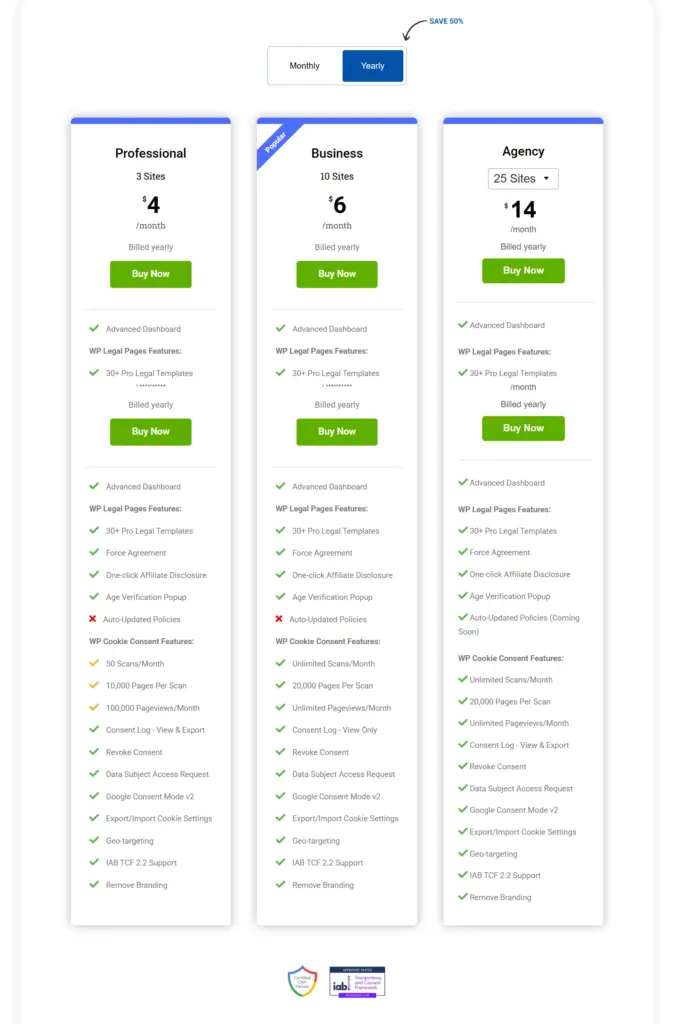
Choose the one that aligns with your business needs.
Step 4: Configuring WP Cookie Consent’s Cookie Settings
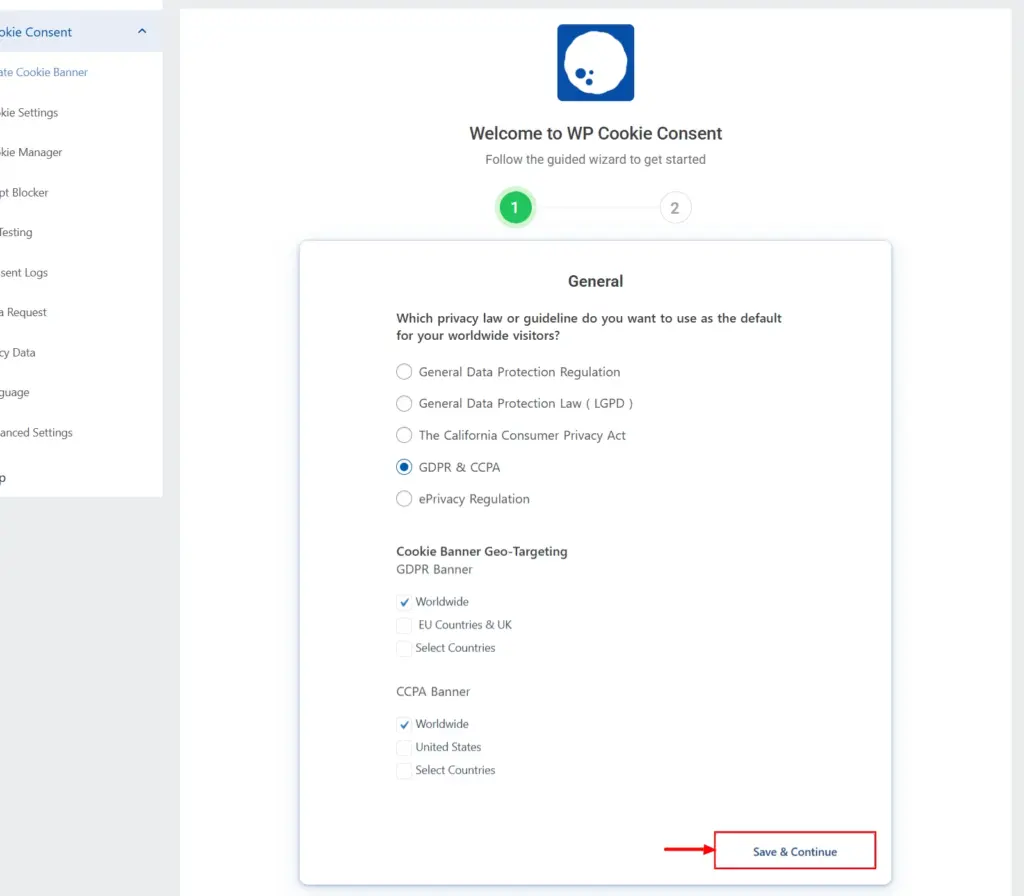
On the following page, choose the law you want to comply with, and the next question you receive will vary depending on the privacy law you selected. Click on Save & Continue.
Next, the wizard will take you to the cookie settings tab. In this, you can find four subtabs: General, Layout, Content and Design, Custom CSS, and Connection.
As per our discussion, we’ll be focusing on the General Settings tab here. In here, you can find the geo-targeting feature.

In this section, you get to choose the type of law you want your banner to comply with. Go to the ‘Select the Type of Law’ and click on the dropdown beside it. You will find multiple laws to choose from: GDPR, CCPA, ePrivacy, LGPD, and GDPR & CCPA.
Based on the privacy law you choose in this section, the options in the geo-targeting change dynamically.
For example, when you select GDPR, you can select the options: Worldwide, EU Countries & UK, and Select Countries (dropdown). The banner will be shown to the audience in the country that you’ve selected.
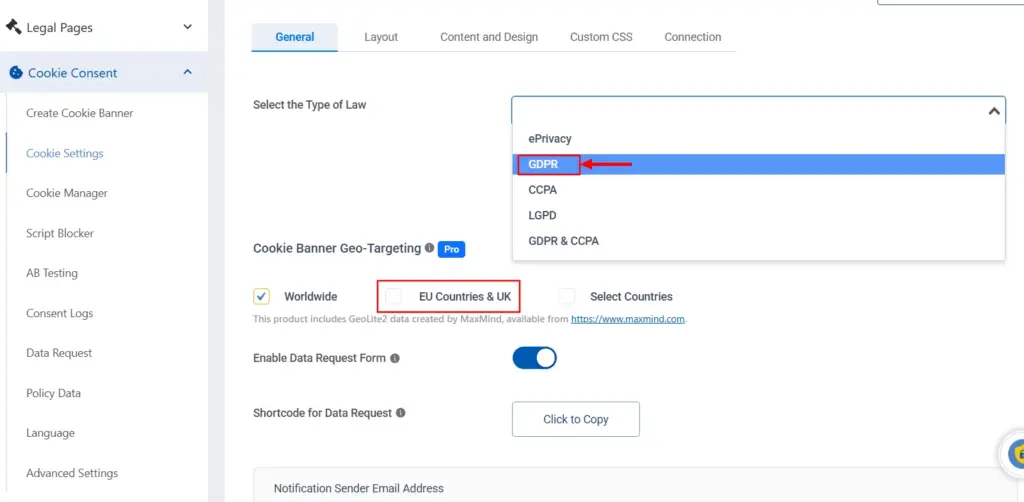
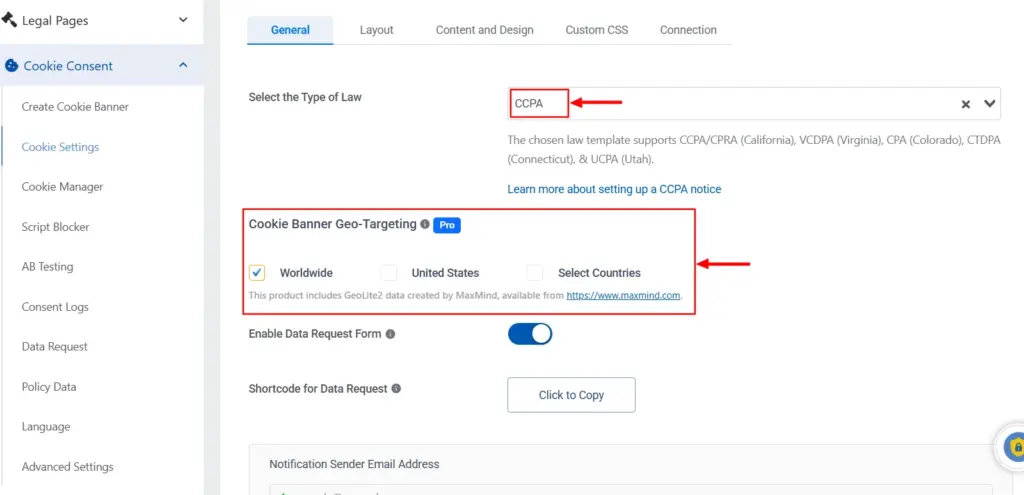
When you select the CCPA, you can see the EU Countries & UK option getting changed to the United States. The other two remain the same.
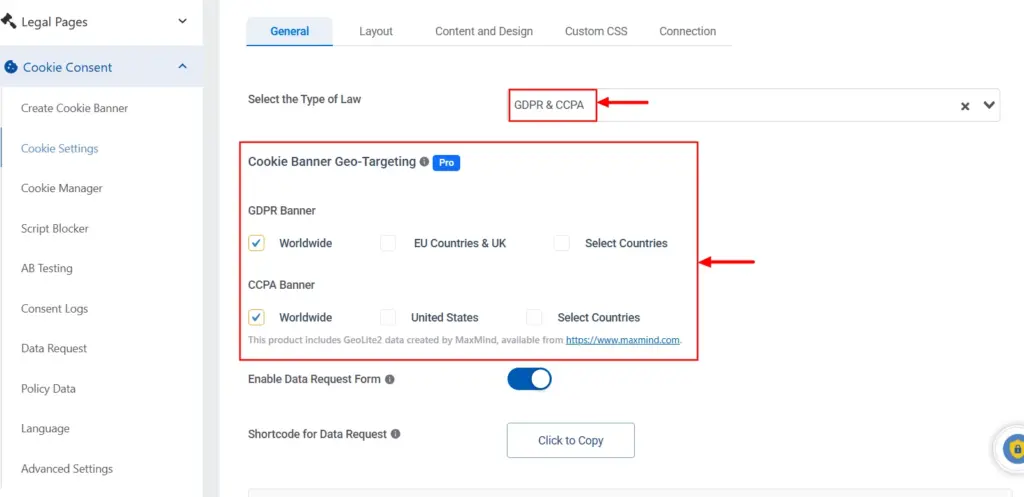
When you select GDPR & CCPA, you get to see two separate rows as shown below. One for the GDPR banner, and the other for the CCPA banner.
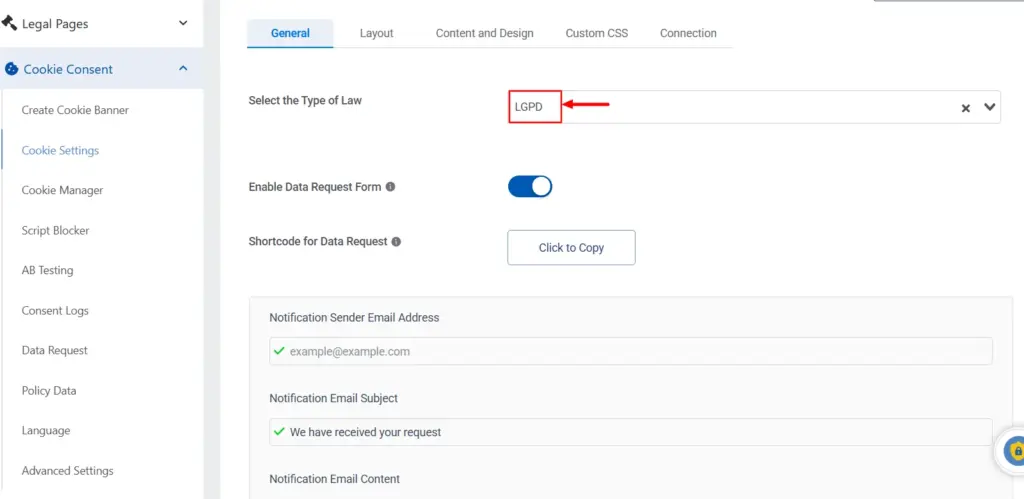
Choosing laws like ePrivacy and LGPD would lead to the disappearance of these options. Because these laws apply more broadly and don’t need separate regional targeting, the tool removes the geo-based selection options automatically.
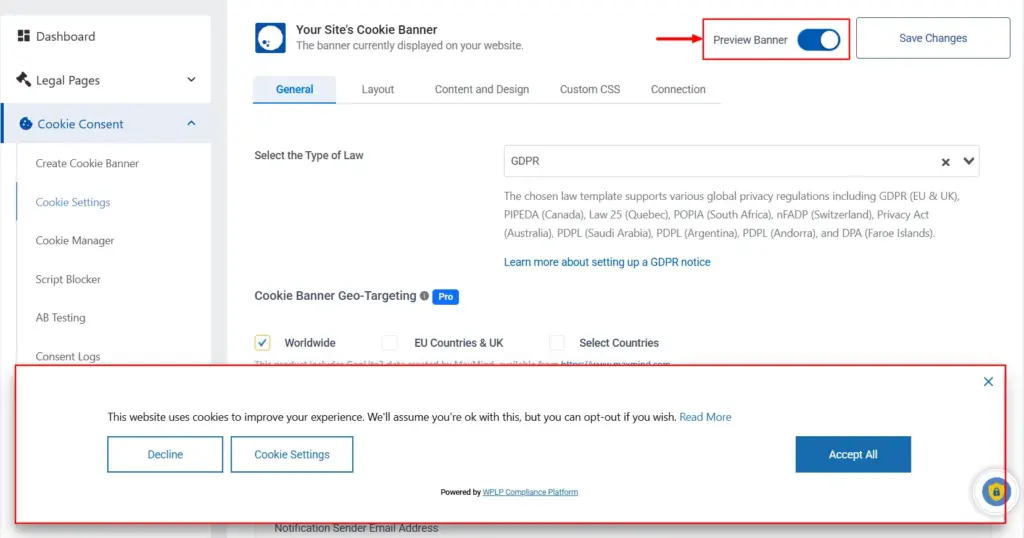
You can then preview the banner by toggling on the ‘Preview Banner’ option. Once you feel everything is alright and as expected, save the changes.
Before that, make sure to check out all the other tabs in the cookie settings, so you can get a banner that is aligned with the design, layout, and privacy laws of your business.
Additional Ways to Improve Compliance and User Trust
Let’s now explore practical ways to make your cookie setup clearer and more user-friendly.
- You should keep the message simple. Most visitors do not want legal terms or long blocks of text. There should be a short line explaining why cookies are used and how they help is often enough.
- Many users make decisions faster when the banner layout is clean. One clear accept button and one option to review settings feel calmer than many buttons. It shows respect and gives control without overwhelming them.
- Visitors also trust banners that explain cookies’ purpose in plain language. For example, saying analytics cookie or marketing cookie feels easier to understand than vague terms. This helps users feel informed rather than tricked.
- You can also improve the experience by reducing cookie categories. Not every cookie needs its own group. Fewer groups feel easier to manage and make the banner less confusing.
- A mobile-friendly banner is important as many users browse on phones. The text should be easy to read, the buttons easy to tap, and the pop-up should not block the full screen.
- Updating your policies is another good step. Laws and expectations change. When your privacy policy stays current, users feel safe and protected.
FAQs
A common example is a site that shows a strict consent banner to EU visitors and a not-so-stricter one to US visitors. The system in the backend reads the visitor’s location and shows the rules that match that region. This will help keep the site away from any potential legal issues.
There are so many countries that require websites to display a cookie banner. For instance, most EU countries and the UK expect a clear cookie banner for any non-essential cookies. Brazil & Canada also expect consent or a clear notice. In the US, some states ask for strong privacy rights, so banners are used to stay safe.
The difference between geo-targeting and geofencing: Geo-targeting shows different content or consent messages based on the country the user is from. Whereas, Geofencing reacts when someone enters a small area like a store zone. So, we can say that Geo-targeting is wide and Geofencing is very local.
Yes, they should definitely be. Tracking cookies follow user actions and can collect their personal data. Some stricter regions, like the EU countries, need clear consent before these cookies load. If you use them without care, you may lose trust or, even worse, break privacy rules, so it is better to manage them carefully.
They are needed in many places. The EU and the UK expect clear consent for most cookies. Other regions ask for notice or some control. If your site gets visitors from many regions, it is safer to use a banner that fits each rule.
Conclusion
Now you clearly know why one banner can’t serve every visitor. You’ve seen how privacy laws change across regions, and when it makes sense to split cookies by region. Also, you’ve learnt how cookie banner geo-targeting helps create a setup that feels fair & compliant.
Some users need a full block, some only need a soft notice, while some others only need a small opt-out link. So a single banner can hurt trust. It can also harm your analytics and tracking setup.
As your audience grows, set your consent and privacy settings based on where your visitors come from. You don’t need deep legal knowledge, but understanding the basics helps you make smarter choices and protect your business.
At the end of the day, geo-targeting is just a feature that helps you protect the privacy of users in a better way. And if you want an easy way to do it right, WPLP is here to support you.
If you liked reading this article, you should also consider going through the following.
- Understanding the Difference Between Cookie Notice and Cookie Policy.
- How to Avoid Dark Patterns in Cookie Banners.
- How Strict Are Cookie Consent Laws in Asia-Pacific
Ready to secure your global presence? Grab the WPLP Compliance Platform today!