Summary
This also allows you to protect users’ privacy by not revealing their personally identifiable information (PII).
However, using server-side tracking alone does not guarantee compliance; user consent must also be obtained to track and process PII. You must combine SST with the appropriate methods of obtaining consent from users.
How can server-side tracking help you stay GDPR-compliant? Most website owners have asked this at some point, especially as privacy rules get stricter and third-party cookies disappear.
Server-side tracking answers this by giving you far more control over your users’ data. Instead of letting third-party scripts collect information directly in the browser, your server filters, cleans, and decides exactly what data gets shared, making the entire process safer, more private, and more compliant.
In this guide, we’ll break down what server-side tracking is, why it matters for GDPR, and how it differs from client-side tracking.
What Is Server-Side Tracking? A Simple Explanation
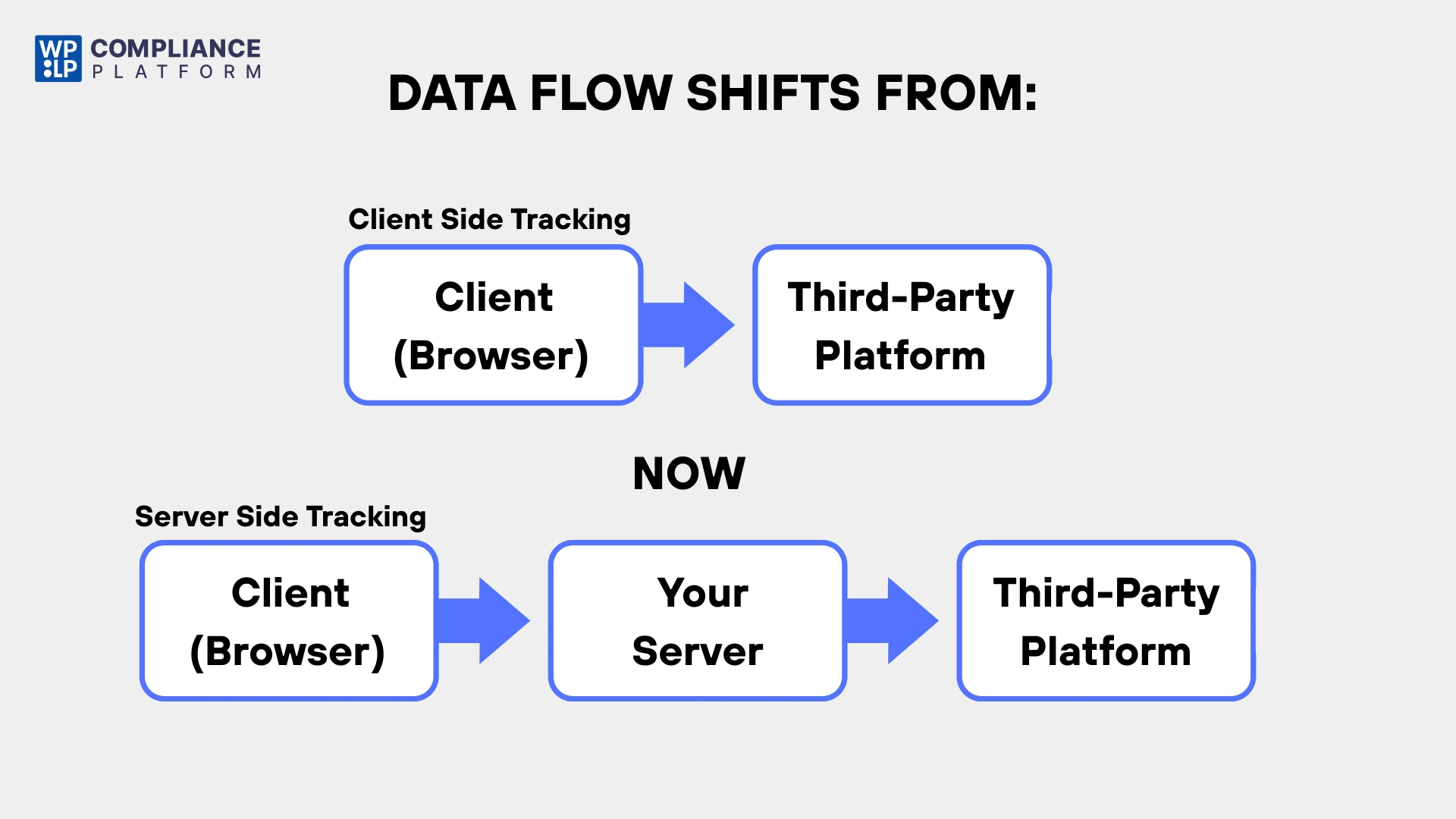
To understand server-side tracking, you need to understand client-side tracking first.
When a user visits your website, their browser, which is the client, loads a tracking script such as Facebook Pixel or Google Analytics tag.
These scripts can fire before consent if not properly configured and send data directly from the user’s browser to the third party. As a result, your website loses control over the data instantly.
With server-side tracking, your server collects and processes the data before sharing it.
Instead of sending user data directly from a visitor’s browser to third-party services like Google Analytics or Facebook Pixel, the data first goes to your own server. From there, you decide what to forward and what to filter.
This approach gives you more control over your data and supports first-party data strategies, as you can decide which data to store. This provides better privacy, and users’ personal information is a key foundation of GDPR tracking compliance.
How Server-Side Tracking Works
Let’s take a look at how server-side tracking really works behind the scenes. In client-side tracking, the browser handles everything. But in server-side tracking, your server becomes the central hub that will process all the tracking data before sending it anywhere else.
Step-by-Step Guide to Server-Side Tracking
1. A user visits your website
When the user visits your site, some client-side interaction is still required in the browser (e.g., events, fetch requests), including page views, clicks, and form submits.
2. Your website sends data to your own server endpoint
Instead of directly sending the data to Google or Facebook:
- Your site sends the tracking data to your own server URL, such as: https://mywebsite.com/collect
- This can be done through Measurement Protocol, webhooks, or a custom API request.
There are no third-party scripts executing on the user’s device.
3. Your server processes the data
With server-side tracking, you have complete control over which data is shared with third parties. Your server cleans up everything that is not needed and anonymises IP addresses during processing.
Email addresses are hashed, internal IDs are added for secure tracking, and any sensitive data is blocked from being transmitted.
4. Your server forwards only the allowed data to third-party tools
Once your server has processed and cleaned the tracking data, it then forwards relevant events to the various tools and platforms you are using. This serves to ensure that only information you approve is shared, hence giving you greater privacy and compliance.
5. Third-party tools process the event normally
Events are processed on GA4, Meta, TikTok, and other platforms in a similar way as normal browser tracking. The only differences: now the data is more accurate, the process is more private, and user information is better protected.
How a First-Party Cookie Becomes a “Third-Party-Like” Cookie
This is the part most people get confused about: first-party cookies in server-side tracking. Here’s the simplest explanation.
What normally happens with client-side tracking
Let’s assume that GA4 places a cookie called _ga inside the user’s browser under mywebsite.com. This is a first-party cookie (safe, allowed by modern browsers).
Now what happens with server-side tracking?
When you enable server-side tracking (like Server-Side GTM), you set up a server container on a subdomain like:
https://tracking.mywebsite.com
or
https://analytics.mywebsite.com
Here’s the key part:
GA4 cookies are now set by your server endpoint, not by Google
So instead of Google setting cookies from: https://google-analytics.com
Your server sets the same cookies from: https://mywebsite.com/ga4 (or your server GTM subdomain)
Now browsers see GA4 cookies as still first-party, because:
- They’re issued from your domain, not Google’s.
- Ad blockers allow them because they aren’t coming from known tracking domains.
- They cannot be blocked as third-party cookies because you own the domain.
Why Server Side Tracking Matters for GDPR Compliance
Server-side tracking (SST) does not affect technical or data accuracy. It is a powerful tool that helps website owners align methods with the core principles of the GDPR.
SST provides a controlled environment that significantly supports three key pillars of the GDPR:
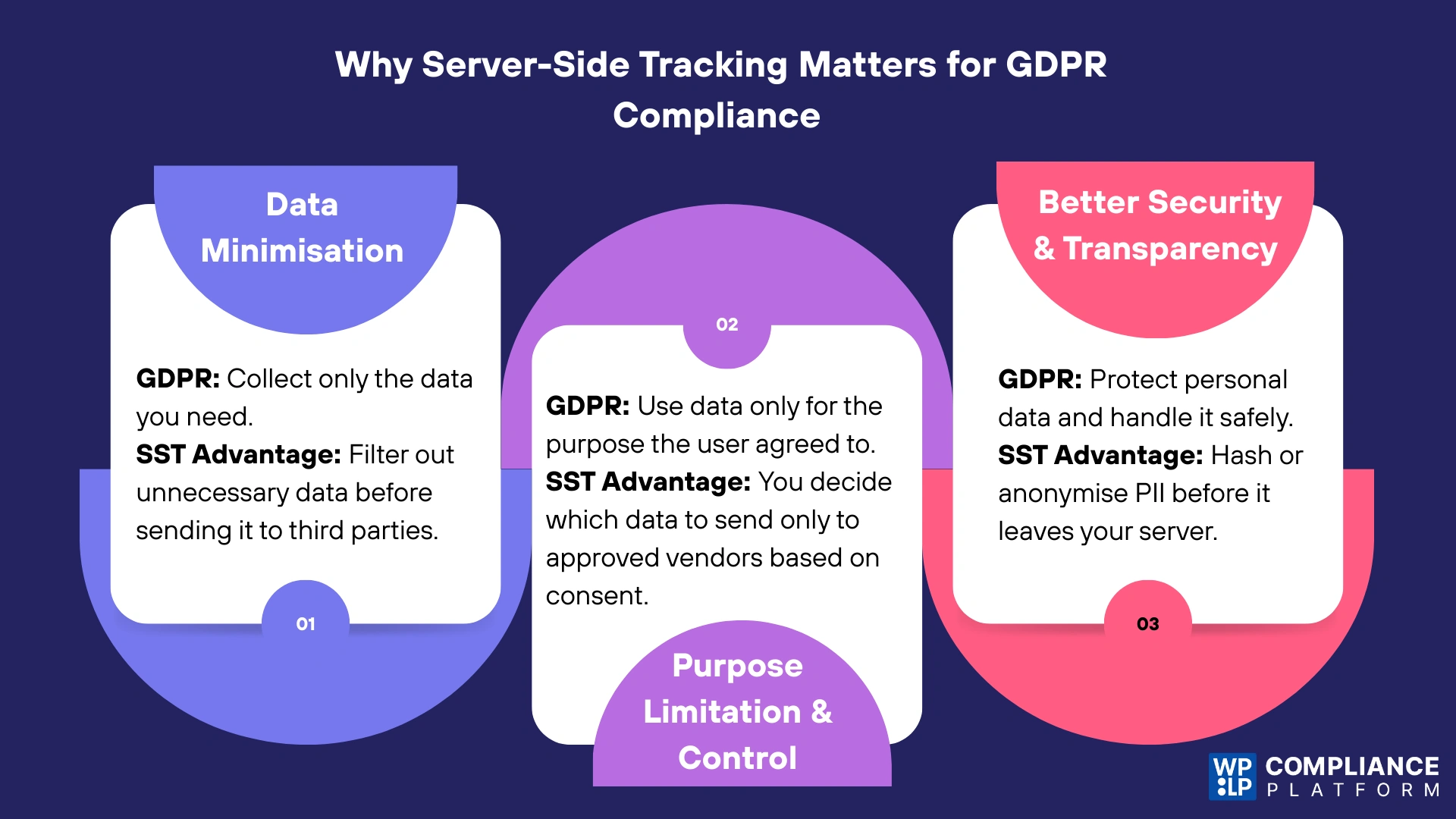
1. Data Minimisation
According to the General Data Protection Regulation (GDPR), companies should only collect the information needed to help users and, therefore, not collect unnecessary items.
How SST Helps: In SST, all raw data passes through your own server first. You have the ability to filter or strip out unnecessary data fields before they are sent on to third parties.
For example, you can remove the user’s full IP address or particular query parameters that are not strictly needed for conversion measurement. Collecting only what is necessary naturally follows careful management of the data you collect.
2. Purpose, Limitation, and Control
Data should be collected only for reasonable and valid purposes and not used for any other purpose.
How SST Helps: Since you control the server, you gain control over where and how data is forwarded.
You can ensure that data is only sent to the specific vendors and for the exact purpose for which the user consented. For example, sending data only to Google Analytics and not to a separate advertising network if the user only consented to “Analytics”.
This improved oversight ensures safer data handling and reinforces the principle of purpose limitation.
3. Enhanced Security and Transparency
SST allows the website to mask or encrypt PII information, even before it leaves your network.
For instance, you can hash an email address so that the third party receives an artificial tag instead of the raw PII. This significantly reduces the direct exposure of personal data to external vendors, demonstrating an enhanced commitment to security and providing better grounds for transparency with users about how their data is handled.
While server-side tracking offers superior technical control and aids in data minimisation, it is a data processing method, not a consent mechanism.
SST does not automatically make you GDPR compliant.
Consent Still Matters. You are still obligated to obtain valid, explicit, and informed consent from the user before you legally begin processing their personal data or using non-essential cookies.
The technical benefits of SST must always be paired with a legal layer (like a Consent Management Platform) that honours the user’s choice and ensures that your server-side tags only fire when permission has been explicitly given.
To ensure that no server-side tracking, analytics or promotional data can be collected before obtaining explicit consent from the individuals, you can rely on the WPLP Compliance Platform (which provides compliance to privacy regulations) and implement it in addition to the Securely Stored Tagging (SST) feature to enforce consent rules on all server-side tracking requests.
Using the WPLP Compliance Platform will help align your SST implementation with new GDPR, CCPA and other privacy laws by monitoring all consent signals before making any server requests and providing the same technical benefits of the SST along with compliant, user-centric consent management capabilities.
What Goes Wrong Without SST (Server-Side Tagging)
Without SST, a considerable portion of a website’s support an incomplete analytics report, with no conversion tracking, nor URL requires an analytical breakdown of tracked users’ actions to assess their conversion performance and provide accurate conversion data properly.
A browser may interact with multiple third-party scripts, each having a potential negative effect on page load speed and impacting users’ experience and Core Web Vitals.
Bowser also potentially restricts the website owner’s ability to control how they collect and process user data, increasing user privacy and data breach risk associated with data privacy protection laws, such as GDPR and CCPA.
What Improves With SST (Server-Side Tagging)
By using Server-Side Tracking (SST), you have a more reliable and efficient way of tracking users. Instead of relying on the browser to collect and process your data, with SST, you are using your own server.
This not only decreases the effect of ad blockers or limitations set by browsers but also provides you with more accurate analytics and conversion data overall. Because there are fewer client-side scripts running, this will help improve your website’s performance and user experience.
You can also use server-side controls to filter, anonymize and forward only data that is needed for your purposes. Overall, SST increases the security of your data, enhances your compliance with privacy law and allows you to gain insights into how to optimize and make decisions based upon your marketing efforts.
Server-Side vs Client-Side Tracking: What’s the Difference?
Understanding the difference between server-side tracking and client-side tracking is important in order to develop sound policies for Data Governance & GDPR Compliance when developing a business strategy.
This is why today, server-side tracking is generally considered the best way to respect individuals’ privacy.
Below is the key difference between the two tracking methods.

The Privacy and Compliance Takeaway
They differ fundamentally in control and data exposure. Client-side tracking exposes data more and can collect excessive information without your oversight.
Server-side tracking helps you follow GDPR rules by removing unnecessary data and hiding personal information before it leaves your server. This centralisation of data processing makes SST a significantly more privacy-conscious approach.
Important Note: Although server-side tracking gives you greater technical control, it doesn’t eliminate the need for consent. Consent is legally necessary regardless of whether you are sending personal information or non-essential cookies via your website’s Client or Server. Therefore, pairing your technical capabilities with an effective Consent Management System is essential.
FAQ
Yes, but you have to respect user consent. You can only track and forward data regarding users who have given permission for particular purposes.
Not necessarily. Various tools or integrations still rely on client-side scripts. The SST enhances client-side tracking in terms of control and privacy, but doesn’t replace consent requirements.
Yes, it allows for better filtering, anonymization, and controlled data sharing by centralizing data processing on your server, making it a more privacy-conscious approach.
No. SST alone does not reduce GDPR fines. It only helps when combined with proper consent handling using a platform like the WPLP Compliance Platform.
Yes. If you use non-essential cookies or process personal data, a cookie banner is still required. Tools like the WPLP Compliance Platform ensure server-side tags fire only after consent.
Conclusion
If you run a privacy-focused website, Server-Side Tracking (SST) is an effective way to enhance your control over how data is gathered, filtered, and transmitted.
By shifting data processing from the browser to your own server, you can minimise unnecessary data, safeguard sensitive information, and create a more transparent tracking environment that aligns with GDPR principles.
SST improves user privacy and decreases the risk of third-party tracking. However, even with this advancement in user privacy, it still does not exempt you from needing to obtain explicit consent from users before you process any personal data.
To comply with GDPR Regulations, you must also have both a technical means of controlling the user’s data and the user’s explicit permission before that data can be processed.
When server-side tracking is paired with a solid consent management solution, you achieve a stronger, safer, and more future-ready approach to data governance.
If you like this article, consider reading these.
- What Is IAB TCF?
- How to Create a Cookie Policy For Your Website
- Should You Accept Cookies From Every Website?
Disclaimer: The article is only for information purposes.